Trust Wallet — the world’s most downloaded non-custodial crypto wallet: 220+ million users, support for 100+ blockchains (Bitcoin, Ethereum, Solana, BNB Chain, TON, etc.), $0 fees for staking, sending, and receiving (you only pay the network gas). An intuitive interface, a powerful built-in exchange, and DeFi tools. The key update in 2026: a new wallet type, SWIFT (based on passkeys/biometrics), has appeared alongside the classic Secret Phrase, as well as encrypted cloud backup in iCloud/Google Drive. In this guide: step-by-step setup, how to properly save your seed phrase, why a backup is needed and how to make one safely, how to send and receive crypto, and an honest breakdown of the risks.
Disclaimer: This material is for informational purposes only. Trust Wallet is a non-custodial wallet: you are solely responsible for keeping your seed phrase safe. If it is lost, access cannot be restored impossible — no support team can help.
- What to know about Trust Wallet in 2026
- What is Trust Wallet
- Why Trust Wallet Is So Popular
- Trust Wallet Classic vs SWIFT
- How to create
- Step 1: Download the official app
- Step 2: Create a new wallet
- Step 3: Set a local password/biometrics
- Step 4: Get the seed phrase
- Step 5: Confirm the seed phrase
- Seed phrase
- What is a seed phrase
- Why the seed phrase is essential
- How to store a seed phrase correctly
- What you should NOT do with a seed phrase
- Backup
- What’s the difference
- Why a backup is needed
- How to make an encrypted backup in iCloud / Google Drive
- Essential rule for the encryption password
- Why cloud backup is convenient, but with a caveat
- How to receive
- Step by step
- The main rule when receiving
- How to send
- Step by step
- Checklist before sending
- Swap exchange
- How to swap
- Security
- What makes Trust Wallet secure
- Real risks
- Golden security rules
- FAQ
- Is Trust Wallet safe in 2026?
- Is Trust Wallet owned by Binance?
- What happens if I lose my seed phrase?
- Can a seed phrase be stored in the cloud?
- How much does it cost to use Trust Wallet?
- Which blockchains does Trust Wallet support?
- How is Trust Wallet different from MetaMask?
- What is Trust Wallet SWIFT?
- Conclusion
What to know about Trust Wallet in 2026
- 220+ million users — the world’s most downloaded self-custody wallet
- 100+ blockchains natively (the infrastructure supports 130+)
- $0 Trust Wallet fees for sending, receiving, and staking (you only pay network gas)
- Two wallet types: the classic Secret Phrase and the new SWIFT (passkeys + biometrics, gas-less swaps)
- Encrypted cloud backup — an option to save your seed phrase to iCloud/Google Drive with a separate password
- Security Scanner — warns about risky dApps and scam addresses
- Important: since May 2025, Trust Wallet no longer belongs to Binance — it is an independent company
- Non-custodial — only you control the keys (and only you are responsible for them)
Main point: Trust Wallet gives you full control over your crypto. That is both a strength (no one can freeze your funds) and a responsibility (lose your seed phrase — lose everything).
What is Trust Wallet
Trust Wallet is a mobile app (plus a browser extension) for storing cryptocurrency, where you control your own keys. This is called a non-custodial (self-custody) wallet — unlike an exchange, where the company owns the keys.
The wallet was founded in 2017 by Viktor Radchenko, acquired by Binance in 2018, and has been independent again since May 2025.
Why Trust Wallet Is So Popular
- Intuitive interface — even a beginner can figure it out
- 100+ blockchains in one app — Bitcoin, Ethereum, Solana, BNB Chain, TON, Polygon, Arbitrum, and many others
- Free to use — Trust Wallet does not charge transfer fees (network fees only)
- All in one — storage, swaps, staking, NFT, dApps, and buying crypto with a card
- Mobile-first focus — convenient to manage from your phone
- Security Scanner — built-in protection against scam addresses
Trust Wallet Classic vs SWIFT
In 2026, there are two types of wallets:
| Parameter | Classic (Secret Phrase) | SWIFT (Smart Account) |
|---|---|---|
| Access | 12/24-word seed phrase | Passkey + biometrics |
| Recovery | Via seed phrase | Via passkey |
| Swaps | Standard (with gas) | Gas-less possible |
| For whom | Classic choice, full control | For beginners who are afraid of seed phrases |
In this guide, the focus is on the classic wallet (Secret Phrase) — it gives maximum control and is suitable for most users.
How to create
Registration takes 3-5 minutes. Let’s go through it step by step.
Step 1: Download the official app
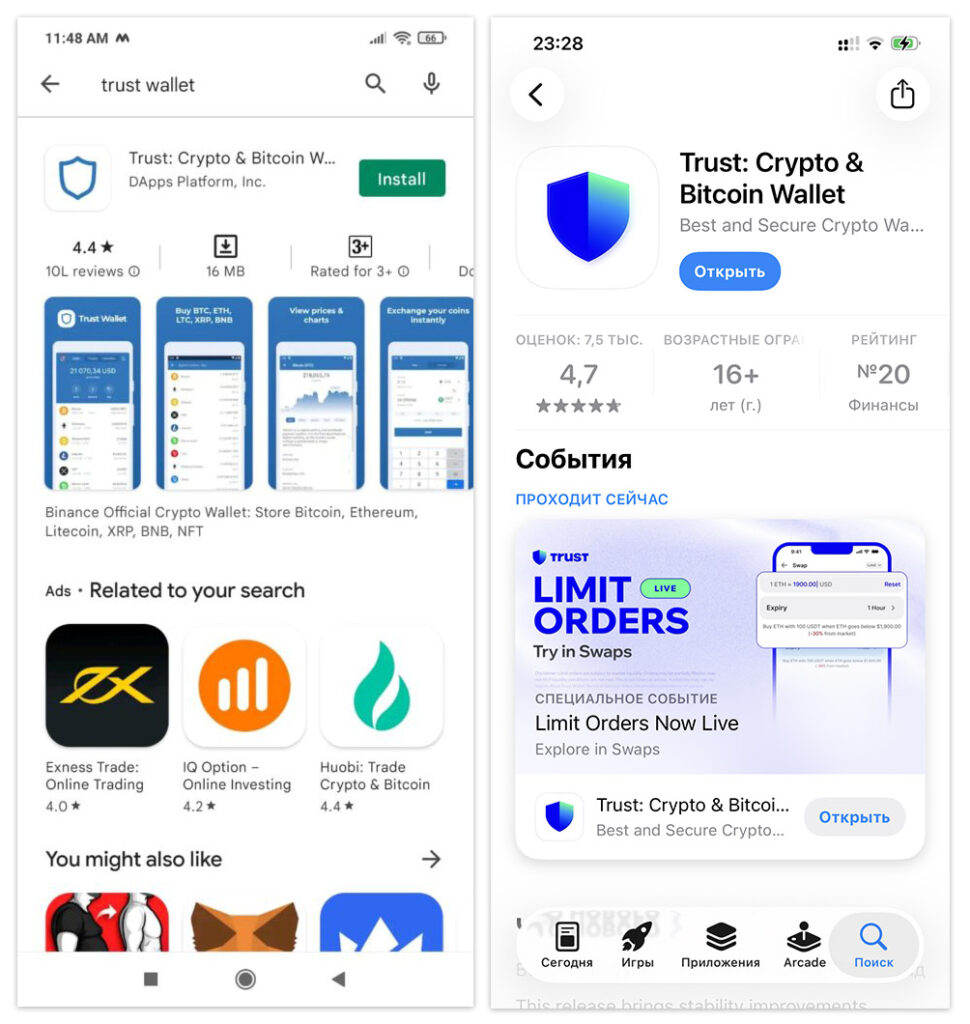
Essential: download only from official sources:
- iOS: App Store → «Trust Wallet»
- Android: Google Play → «Trust Wallet»
- Or direct links from trustwallet.com/download
No APKs from third-party sites! There are many fake “Trust Wallet” apps — they steal crypto. Check the developer (Trust Wallet) and the number of reviews.
Step 2: Create a new wallet
- Open the app
- Tap “Create a new wallet”
- Choose a type: Secret Phrase (classic) or SWIFT
- Accept the Terms of Use
Step 3: Set a local password/biometrics
Create a 6-digit PIN or enable Face ID / Touch ID. This protects the app if your phone falls into someone else’s hands.
Step 4: Get the seed phrase
App will generate 12 (or 24) words — this is your seed phrase (Secret Recovery Phrase). More on it in the next section. This is the most important step.
Step 5: Confirm the seed phrase
Trust Wallet will ask you to choose the words in the correct order — this is a check that you have written them down. Without this, the wallet will not be activated.
Done! The wallet has been created. Now the most important thing is to properly protect the seed phrase.
Seed phrase
This is the most important part of the entire manual. The safety of your funds depends on understanding the seed phrase.
What is a seed phrase
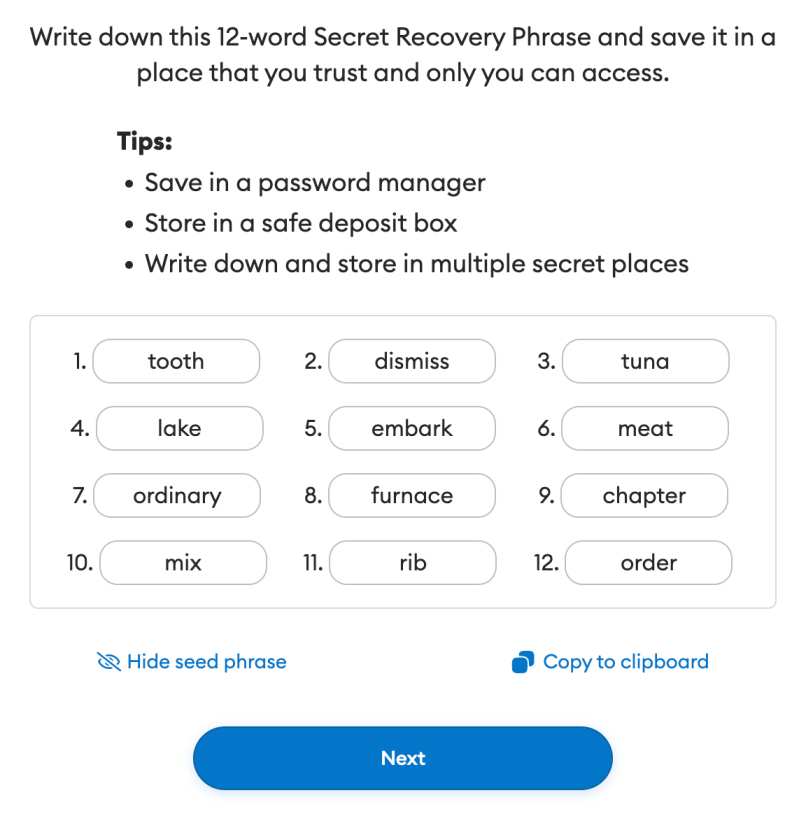
Seed phrase (seed phrase, Secret Recovery Phrase, mnemonic phrase) is 12 or 24 words in a specific order that serve as the master key to your entire wallet.
Example (DO NOT use — this is a sample!):
Why the seed phrase is essential
Seed phrase = your money. Whoever knows the seed phrase owns the crypto. Therefore:
- Anyone with your seed phrase will get full access to the wallet
- If you lose your seed phrase and phone, your crypto is lost forever
- Trust Wallet does NOT store your seed phrase and cannot recover it
- No “support” can help — that is the essence of a non-custodial wallet
MAIN RULE: never show your seed phrase to anyone, ever. Not to “support,” not in Telegram, and not in forms on websites. Anyone who asks for your seed phrase is a scammer. Trust Wallet never asks for it.
How to store a seed phrase correctly
✅ Write it on paper — by hand, legibly, in the correct order
✅ Make 2-3 copies and store them in different secure places
✅ Consider a metal backup (steel plate) — it won’t burn or get wet
✅ Check that you wrote it down correctly — verify each word
What you should NOT do with a seed phrase
❌ Screenshot — it can end up in the gallery or cloud and may leak
❌ Notes on your phone (Notes) — not secure
❌ Message it to yourself in Telegram/messenger — if your account is hacked, your crypto is lost
❌ Photo on your phone — automatic upload to the cloud
❌ Text file on your computer — viruses steal such files
Important nuance: Trust Wallet officially warns users not to store the seed phrase in regular cloud backups, notes, or screenshots. The app itself does NOT upload the seed phrase to the cloud automatically. But there is a separate secure option — an encrypted cloud backup. More on that below.
Backup
Here’s the subtle point that’s important to understand correctly. Trust Wallet offers encrypted cloud backup — and this does not conflict with the rule “do not store your seed phrase in the cloud.”
What’s the difference
🚫 Bad: screenshot of the seed phrase → auto-upload to iCloud → if the Apple ID is hacked, the thief sees the words in plain text
✅ Good: Trust Wallet encrypted cloud backup → the seed phrase is encrypted with a separate password → even if someone gains access to the cloud, the file is useless without the password
Why a backup is needed
Think about scenarios:
- Phone lost or stolen
- Phone broke (fell into water, got damaged)
- You changed devices
If you have only a paper copy and you lose it, the crypto is gone. A backup copy provides a second recovery path.
Best strategy: paper (primary) + encrypted cloud backup (secondary). Two independent recovery methods.
How to make an encrypted backup in iCloud / Google Drive
For a new wallet:
- When creating it, select “Back up to Google Drive” (Android) or “Back up to iCloud” (iOS)
- Set a unique encryption password
- The backup will be saved in encrypted form
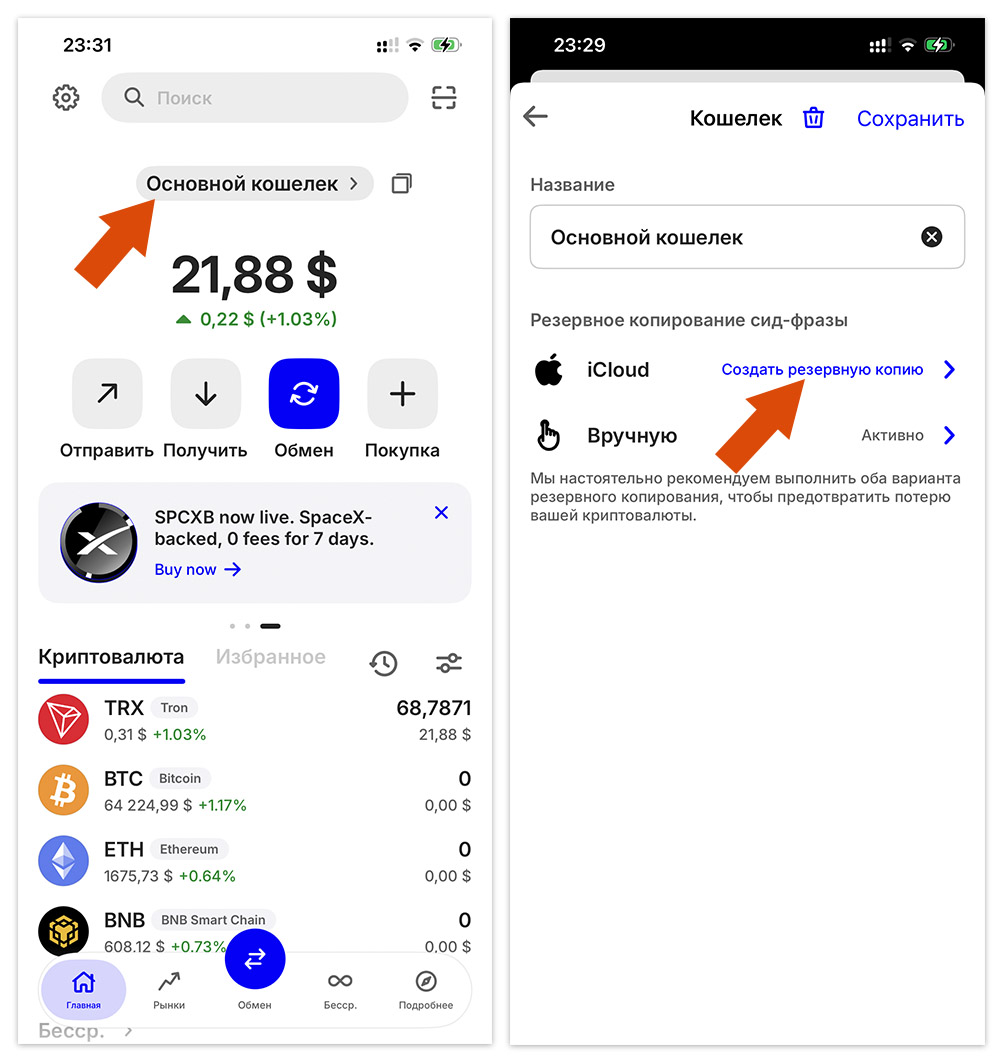
For an existing wallet:
- Open Settings
- Wallets → select a wallet → ⓘ (Info)
- Tap Cloud Backup
- Set a strong, unique encryption password
Essential rule for the encryption password
Do not use your Google/iCloud password as the backup encryption password!
Use a separate, strong, unique password. The logic is: if someone hacks your Apple ID/Google account, they will get the encrypted file, but without a separate password they won’t be able to decrypt it.
If you forget the encryption password, the backup is useless. Write down this password just as securely as the seed phrase itself.
Why cloud backup is convenient, but with a caveat
✅ Plus: protection against losing/breaking your phone
✅ Plus: quick recovery on a new device
⚠️ Caveat: security depends on the strength of the encryption password + the security of the cloud account
For large amounts, professionals recommend a hardware (cold) wallet (Ledger, Trezor) instead of cloud backup. Trust Wallet is a “hot” wallet (connected to the internet), great for everyday use and medium amounts. For more details, see our TOP 10 crypto wallets 2026 ranking.
How to receive
Receiving cryptocurrency in Trust Wallet is simple.
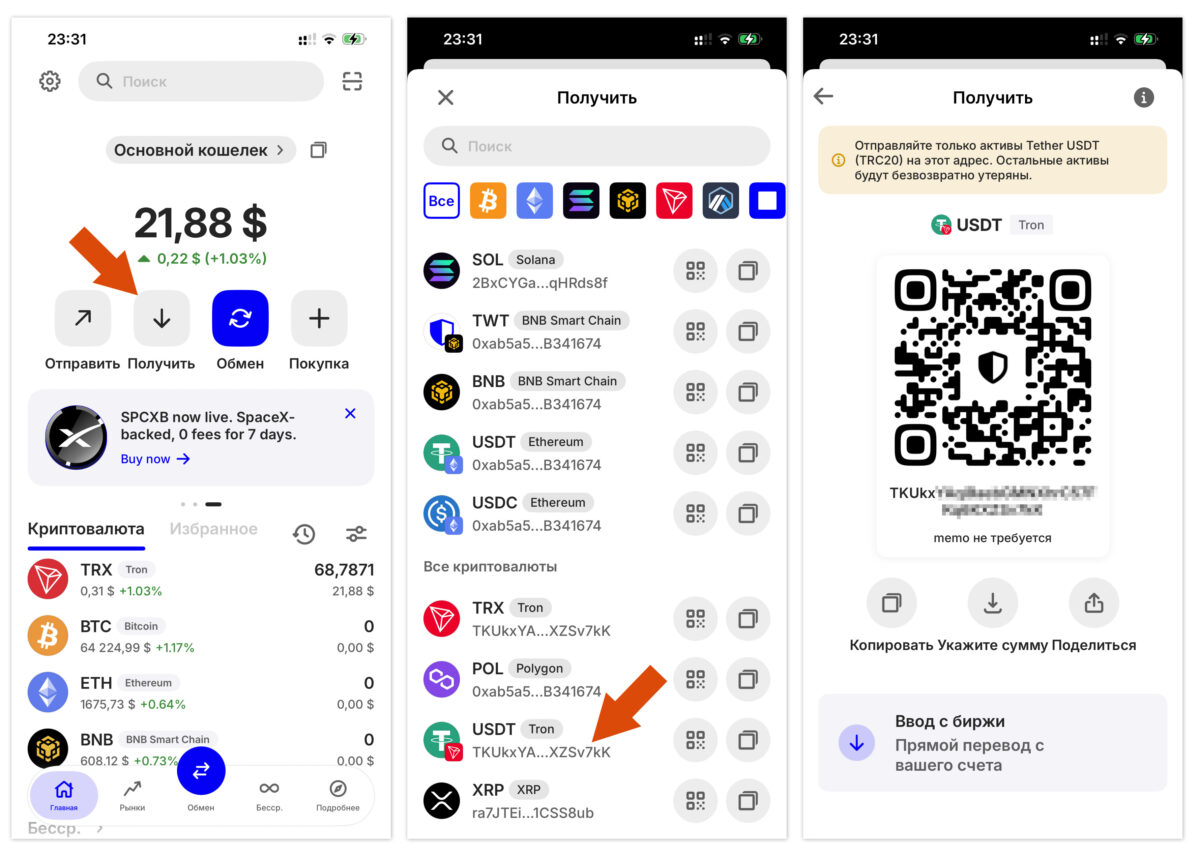
Step by step
- Open the app and tap “Receive”
- Select the coin (for example, USDT, BTC, ETH, SOL)
- Choose the correct network! (for USDT — TRC20, ERC20, BEP20, Solana, etc.)
- Your address and QR code will appear
- Copy the address or show the QR code to the sender
The main rule when receiving
The sender’s network must match the recipient’s network!
If you are being sent USDT on the TRC20 network, your address must also be for TRC20. Sending to the wrong network = loss of funds forever.
More about networks — in our guide USDT TRC20 vs ERC20 vs BEP20.
How to send
Sending crypto is the reverse process.
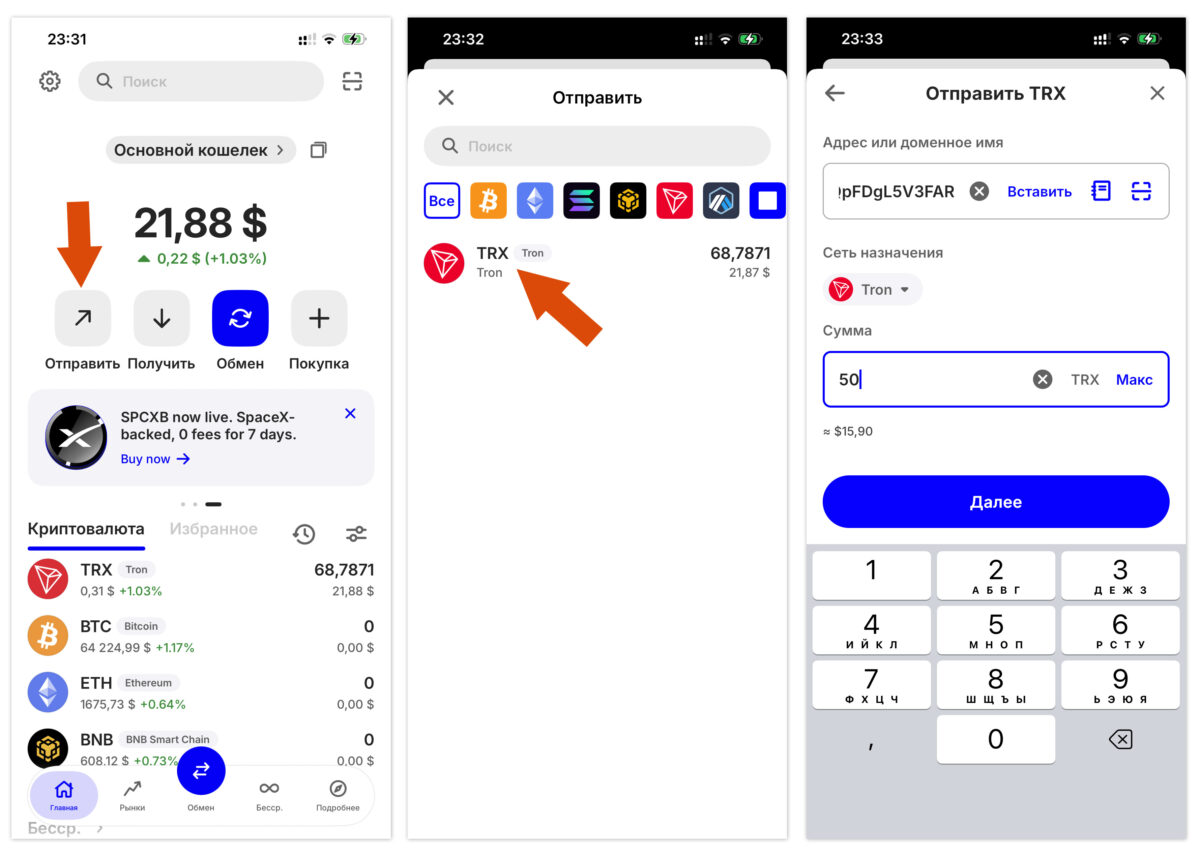
Step by step
- Click “Send”
- Select the coin and network
- Paste the recipient address (or scan the QR code)
- Enter the amount
- Check the network fee (gas)
- Double-check the address and network 3 times!
- Confirm → enter PIN/biometrics
Checklist before sending
- The correct coin?
- The correct network?
- Has the address been copied in full and correctly?
- Is there enough of the native token for gas? (for example, ETH for Ethereum, SOL for Solana)
- For the first transfer — a small test amount?
Tip: when making the first transfer to a new address, send a small test amount ($1-5). Make sure it arrives, then send the rest. This helps avoid costly mistakes.
Swap exchange
Trust Wallet has a built-in exchange — you can swap one cryptocurrency for another without withdrawing to an exchange.
How to swap
- Click “Swap”
- Select the “send” and “receive” coins
- Enter the amount
- Check the exchange rate and fee
- Confirm
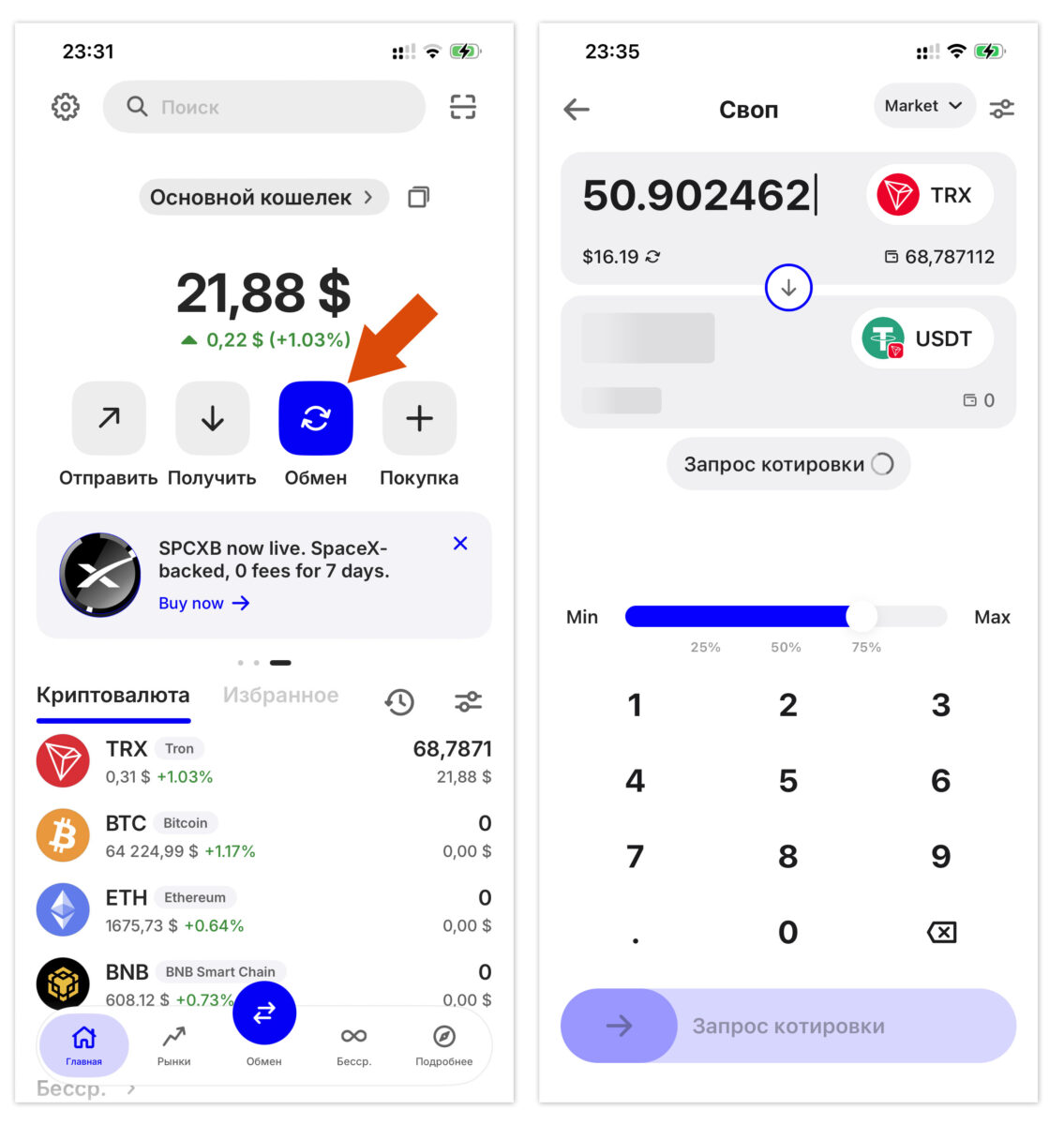
Trust Wallet charges a small fee for swaps (this is its source of revenue after moving away from Binance), plus network gas. It’s convenient for one-off exchanges; for larger amounts, compare the rate with an exchange.
Security
To be fair, Trust Wallet is reliable, but it is a hot wallet, and there are risks.
What makes Trust Wallet secure
- Non-custodial — only you hold the keys; the company cannot freeze your funds
- Security Scanner — warns about risky dApps and scam addresses
- Local key storage — on your device
- Biometrics + PIN — app protection
- Security team — monitors and blocks phishing domains
Real risks
This is a hot wallet — it is connected to the internet, so it is vulnerable to:
- Phishing — fake websites, apps, forms
- Malware on the phone
- Malicious approvals — signing a dangerous transaction in a dApp
- Device compromise
Incident at the end of 2025: there was a vulnerability in the browser extension (version 2.68) that led to losses for some users. The mobile app was not affected, but the lesson is: keep the app updated and be cautious with the extension.
Golden security rules
✅ Never show anyone your seed phrase — never, under any circumstances
✅ Download only the official app
✅ Update the app to the latest version
✅ Enable biometrics + PIN
✅ Check addresses before sending (3 times)
✅ Be careful with dApps — do not sign suspicious transactions
✅ For large amounts — use a hardware wallet (Ledger, Trezor)
✅ Do not keep all your money in one hot wallet
Diversification strategy: everyday amounts — in Trust Wallet (convenient), larger savings — in a cold wallet (secure). More details in the wallet ranking.
FAQ
Is Trust Wallet safe in 2026?
Yes, Trust Wallet is considered a reliable non-custodial wallet — the keys are stored only on your device, and the company does not control your funds. It has 220+ million users, a Security Scanner, and an active security team. But it is a hot wallet, so the risks of phishing, malware, and user error remain. For large amounts, a hardware wallet is recommended. The main protection is proper storage of the seed phrase.
Is Trust Wallet owned by Binance?
Not anymore. Trust Wallet was acquired by Binance in 2018, but as of May 15, 2025, it is no longer owned or controlled by Binance Exchange Group. It is now an independent company. This does not affect the wallet’s security or functionality — it continues to operate as a fully non-custodial wallet.
What happens if I lose my seed phrase?
If you lose your seed phrase AND access to your device (or to an encrypted cloud backup), your cryptocurrency will be lost forever. Trust Wallet does not store seed phrases and cannot restore access — that is the essence of a non-custodial wallet. Therefore, it is essential to write down your seed phrase on paper, make several copies, and optionally set up an encrypted cloud backup with a separate password.
Can a seed phrase be stored in the cloud?
Storing a plain screenshot of the seed phrase in the cloud (via photo auto-upload) is dangerous and not recommended. But Trust Wallet offers a special option — an encrypted cloud backup in iCloud/Google Drive with a separate encryption password. This is safe provided that the encryption password is strong, unique (not the same as the one for Google/iCloud), and securely stored. The ideal strategy is a paper copy as the primary backup + an encrypted backup as a secondary one.
How much does it cost to use Trust Wallet?
Trust Wallet itself is free — there are no fees for storing, sending, receiving, or staking. You only pay the network gas (the blockchain fee, for example ETH for Ethereum, SOL for Solana). A small fee from Trust Wallet and/or third-party partners is charged for built-in swaps (exchanges) and buying crypto by card. Downloading and creating a wallet is completely free.
Which blockchains does Trust Wallet support?
Trust Wallet natively supports 100+ blockchains (the infrastructure is designed for 130+ networks). These include Bitcoin, Ethereum, Solana, BNB Chain, TON, Polygon, Arbitrum, Optimism, Avalanche, Tron, Cosmos, and many others. It is one of the most multichain wallets on the market, making it convenient for managing a diverse portfolio in a single app.
How is Trust Wallet different from MetaMask?
Both are non-custodial hot wallets with a similar security model. The difference is in focus: Trust Wallet is more mobile and multichain (100+ networks, including Bitcoin and Solana), with an emphasis on simplicity. MetaMask is more browser-oriented and focused on EVM networks (Ethereum and compatible chains), and is popular for DeFi on desktop. Trust Wallet is easier for beginners and for those who work with different blockchains from their phone.
What is Trust Wallet SWIFT?
SWIFT — a new type of wallet in Trust Wallet (not to be confused with the SWIFT banking system). It is a smart account based on passkeys and biometrics, without a traditional seed phrase. Recovery is done via passkey, and gas-less swaps are supported. It is suitable for beginners who are afraid of the responsibility of managing a seed phrase. The classic Secret Phrase wallet provides more familiar full control.
Conclusion
Trust Wallet in 2026 is the best choice for most users who want to manage crypto conveniently, across multiple chains, and with full control over their assets. 220+ million users, 100+ blockchains, free transfers, and an intuitive interface make it the No. 1 mobile non-custodial wallet.
Key takeaways:
✅ Download only the official app
✅ Seed phrase = your money — write it down on paper, never show it to anyone
✅ Encrypted backup in iCloud/Google Drive — with a separate strong password
✅ Check the network when sending/receiving (an error = loss of funds)
✅ Test amount for the first transfer to a new address
✅ Update the app and enable biometrics
⚠️ This is a hot wallet — for large amounts, use a hardware wallet
Trust Wallet is an excellent entry point into self-custody of crypto. The main thing is to take the seed phrase seriously from day one. Do it right, and the wallet will serve you reliably for years.
If you’re just starting your journey into crypto, explore our guides: how to buy Bitcoin in Ukraine, USDT networks and TOP 10 crypto wallets of 2026.