Short answer: sometimes yes, sometimes no — and it depends on one thing: who controls the private key of the address in the network where the funds actually ended up. If you sent USDT to your own wallet (Trust Wallet, MetaMask), but mixed up the EVM network (BEP20 instead of ERC20, Polygon instead of BSC, etc.) — the funds are almost certainly safe and sitting at the same address on a different network; you can recover them yourself. If you sent them to an exchange on the wrong network, only its support can help, for a fee, and not always or quickly. If you sent them to someone else’s address, it depends only on the owner’s goodwill. But if you send to a contract address, to a network where nobody controls the key, or use incompatible formats (Tron ↔ Ethereum), the funds are usually lost forever. Blockchain is irreversible: there is no “cancel” or chargeback.
- The main principle: where the money actually is
- Why this happens: TRC20, ERC20, BEP20
- Scenario 1: sent to your own wallet, wrong EVM network
- Scenario 2: sent to an exchange on the wrong network
- Scenario 3: sent to someone else’s address
- Scenario 4: when it cannot be returned
- Step by step: how to recover USDT from your wallet
- What to gather for a support ticket
- How to avoid making the same mistake again
- FAQ
The main principle: where the money actually is
A crypto transaction is irreversible. You cannot “recall” a transfer, cancel it, or do a chargeback like with a bank card. So the question is not how to “reverse the transaction,” but whether you (or someone willing to help) have access to the private key of the address in the network where the tokens actually arrived.
All scenarios follow from this. USDT does not “disappear” at the moment of an error — it sits at a specific address on a specific network. If you have the key to that address on that network, the funds can be recovered. If not, it depends on who does.
Why this happens: TRC20, ERC20, BEP20
The root of the problem is that different networks have different address formats, and some of them match.
| USDT network | Address format | Compatibility |
|---|---|---|
| ERC20 (Ethereum) | 0x… | One address and key for all EVM networks |
| BEP20 (BNB Smart Chain) | 0x… | One address and key for all EVM networks |
| Polygon, Arbitrum, Avalanche, Base | 0x… | One address and key for all EVM networks |
| TRC20 (Tron) | T… | Separate format, separate network |
| SPL (Solana) | base58 | Separate format, separate network |
The key takeaway: ERC20, BEP20, Polygon, Arbitrum and other EVM networks use the same 0x… address and the same private key. So sending BEP20 instead of ERC20 to a 0x address is not a “loss,” but tokens arriving at the same address on a different network. But TRC20 (Tron) is a different format (T…): a wallet will usually simply not let you send TRC20 to a 0x… address because the formats do not match. That is why confusion between “TRC20 and ERC20” most often happens not in a self-custody wallet, but on an exchange, where you choose the network from a list for an address controlled by the exchange.
Scenario 1: sent to your own wallet, wrong EVM network
This is the most common and the best-case scenario. You withdrew USDT to Trust Wallet or MetaMask, but selected BEP20 instead of ERC20, for example. Since the 0x… address is the same across all EVM networks, the USDT is already on your address — just on the BSC network. The funds are yours, you control the key, and everything can be recovered. How to do it is in the step-by-step section below.
The only typical catch: to move these tokens, you need a small amount of “gas” — the native coin of that network (BNB for BSC, POL for Polygon, ETH for Arbitrum/Ethereum). If the wallet only has USDT and no gas, the tokens are visible but cannot be sent until you add a little of the native coin.
Scenario 2: sent to an exchange on the wrong network
Here you do not control the key — the exchange does. The deposit address is also 0x…, but if the exchange “listens” to that address only on Ethereum and you sent BEP20, the tokens will land at the same address on BSC and will not be credited automatically. They can be recovered only if the exchange controls the same key on the required network and agrees to “sweep” the funds. Large exchanges handle this on a case-by-case basis:
- Binance — has a deposit recovery tool and a wrong-network procedure; the list of supported networks and timeframes are specified in their documentation.
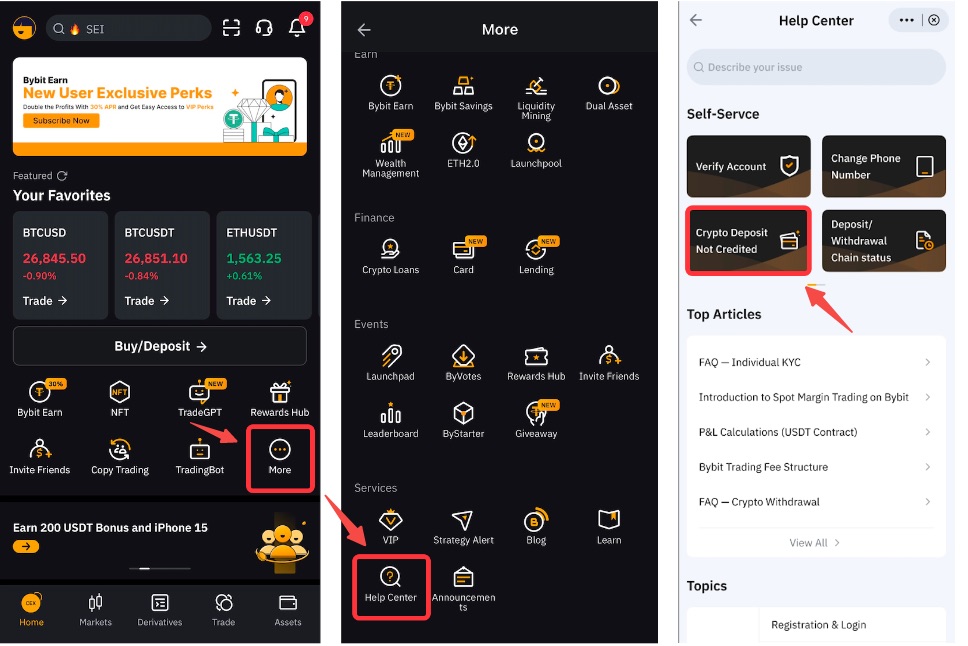
- Bybit — Asset Recovery form, support responds within 3–5 business days, fixed processing fee (around $200).
- OKX — reviews cross-chain requests on an individual basis, with no guarantee, timeframe — up to several weeks. (For example, OKX does not support USDT on the BSC network at all.)
Important: recovery is not guaranteed, it is not available for all networks and coins, there is often a minimum amount and a fee, and it may take weeks to wait. Act immediately — the sooner the ticket is submitted, the better.
Scenario 3: sent to someone else’s address
You transferred to the wrong network to another person’s address (a P2P deal, a friend, a store). If they control the key to that address on the network where the funds were sent (for example, their seed phrase also covers BSC), then only they can return it — voluntarily. Technically, they cannot be forced to do so. Politely explain the situation, provide the transaction hash and a link to the explorer. On an exchange, as the counterparty, they often will not even see the “stuck” tokens without separate actions.
Scenario 4: when it cannot be returned
- Sending to a contract address (for example, to the USDT contract itself rather than to a wallet) is almost always a loss.
- Incompatible formats directly: TRC20 ↔ ERC20, Solana ↔ EVM. Usually the wallet blocks this on send, but some services may “swallow” the order — in that case, a refund is unlikely.
- A network where no one controls the key — the address was generated by the service for only one network, and it cannot “sweep” another one.
- An address with a typo or a burn address that no one controls.
In all of these cases, there is no refund: neither “decoders” nor paid “recovery hackers” — it’s a scam. If someone messages you privately saying “I’ll return your crypto for an upfront payment,” they are scammers.
Step by step: how to recover USDT from your wallet
Works for EVM networks (BEP20/ERC20/Polygon/Arbitrum, etc.) when you control the key:
- Check that the funds have arrived. Enter your address in the explorer for the network you actually used: bscscan.com (BSC), etherscan.io (Ethereum), polygonscan.com (Polygon). If you see a USDT balance, everything is fine.
- Add/enable the required network in your wallet. In Trust Wallet, BNB Smart Chain is enabled by default; in MetaMask, the BSC/Polygon network can be added to the network list if needed.
- Import the USDT token for this network using the correct contract address. Take the contract only from an official source — the “Contracts” section on CoinGecko or CoinMarketCap — so you do not import a fake token.
- Add a little gas — the network’s native coin (BNB/POL/ETH), otherwise the tokens cannot be moved.
- Transfer the USDT wherever needed — to an exchange (now with the correct network!) or to another address.
If your wallet does not support the required network at all, export the private key or seed and import it into a wallet that does support it (for example, MetaMask with the network added). Do this only in the official app and never enter your seed on third-party websites.
What to gather for a support ticket
If this is an exchange case (Scenario 2), prepare the following right away:
- Transaction hash (TxID).
- Sender and recipient addresses.
- The network you actually used and the network you intended to use.
- Coin and amount, date and time.
- Screenshots from the wallet/explorer confirming the transfer.
Describe the problem briefly and to the point: “I withdrew USDT on the BEP20 network to a deposit address that requires the ERC20 network. Please initiate the recovery procedure.” No emotions or threats — this speeds up processing.
How to avoid making the same mistake again
- Test transfer. First send a small amount (for example, 10 USDT), wait for it to be credited, then send the rest.
- Pay attention to the network selector, not just the address. An address
0x…looks the same on Ethereum and BSC — the network selection is what matters. - Match on both ends. The network used for withdrawal must match the network supported by the recipient (exchange/wallet).
- Keep some gas. Keep a little of the native coin in your wallet so you don’t get stuck with “non-withdrawable” USDT.
- Check the address format.
T…is Tron (TRC20),0x…is EVM. They are not interchangeable.
Detailed breakdown of all USDT networks, their fees, and speeds — in our separate article on USDT networks.
FAQ
Sent USDT to the wrong network — is the money gone? Not necessarily. If the address is yours and both networks are EVM-compatible (ERC20/BEP20/Polygon, etc.), the USDT is sitting at the same address on another network and you can recover it yourself. If it was sent to an exchange, contact support. If it was sent to someone else’s address, recovery is only possible with the owner’s consent.
Sent USDT TRC20 to ERC20 — what should I do? A direct transfer from TRC20 to a 0x… address is usually impossible — the formats do not match. If this is about an exchange where you selected the wrong network for its address, open a support ticket with the hash and details. If the tokens really went on Tron to an address that nobody controls, there is no recovery.
Sent BEP20 instead of ERC20 to my MetaMask — how do I recover it? Add the BSC network, import USDT using the official contract, send a little BNB for gas — the tokens will appear, and you can then send them onward.
How much does recovery on an exchange cost? It depends on the exchange. Bybit, for example, has a fixed fee of around $200; others have their own terms and timelines (up to several weeks). Recovery is not guaranteed.
Can I cancel a USDT transaction that has already been sent? No. Confirmed transactions on the blockchain are irreversible. Anyone who promises to “cancel” a transfer or return crypto for an upfront payment is a scammer.