MetaMask is the world’s most popular Web3 wallet and the de facto standard for working with decentralized applications (dApps), DeFi, and NFTs. In 2026, the wallet made a major leap: it added native support for Solana (July 2025) and Bitcoin (December 2025), launched multichain accounts (one seed phrase manages Ethereum, L2, Solana, and Bitcoin addresses), integrated the MetaMask Card and built-in perpetuals. It is a non-custodial hot wallet — only you control the keys. Available as a browser extension and mobile app (iOS/Android), it integrates with Ledger and Trezor. This guide covers step-by-step registration, how to properly store your seed phrase and why this is essential, how to send and receive crypto, and an honest look at security.
Disclaimer: This material is for informational purposes only. MetaMask is a non-custodial wallet: you are solely responsible for keeping your Secret Recovery Phrase (seed phrase) safe. If you lose it, access cannot be restored under any circumstances — no support team can help.
- What to know about MetaMask in 2026
- What is MetaMask
- Why MetaMask is so popular
- What’s new in 2026
- How to create
- Step 1: Download the official app
- Step 2: Create a new wallet
- Step 3: Create a password
- Step 4: Get the seed phrase
- Step 5: Confirm the seed phrase
- Seed phrase
- What is a Secret Recovery Phrase
- Why the seed phrase is essential
- How to store a seed phrase correctly
- What you must NOT do with a seed phrase
- Password vs seed phrase — don’t confuse them
- How to receive
- Step by step
- The main rule when receiving
- How to send
- Step by step
- Checklist before sending
- Swaps and bridging
- Swap (token exchange)
- Bridge (moving between networks)
- dApps and DeFi
- How to connect to a dApp
- The main dApp security rule
- Security
- What makes MetaMask secure
- Real risks (honestly)
- Golden Rules of Security
- Comparison
- Key takeaways
- FAQ
- Is MetaMask safe in 2026?
- What happens if I lose my MetaMask seed phrase?
- Can MetaMask seed phrase be stored in the cloud?
- How much does it cost to use MetaMask?
- Which blockchains does MetaMask support in 2026?
- How is MetaMask different from Trust Wallet?
- What are multichain accounts in MetaMask?
- Is it safe to connect MetaMask to dApps?
- Conclusion
What to know about MetaMask in 2026
- The most popular Web3 wallet — the standard for DeFi, dApps, and NFTs, developed by ConsenSys
- Multichain in 2026: native support for Ethereum + all EVM networks (Polygon, Arbitrum, Optimism, Base, BNB Chain, Avalanche), plus Solana (since July 2025) and Bitcoin (since December 2025), as well as Tron, Monad, Sei
- Multichain accounts — one seed phrase (BIP-44) manages addresses across different networks in a single account
- MetaMask Card — a card for spending crypto in the real world
- Built-in swaps across 10 blockchains + bridging, service fee 0.875% (clearly disclosed)
- Security alerts are enabled by default — they warn about malicious transactions
- Ledger/Trezor integration — you can sign transactions from a hardware wallet
- Rumors about the MASK token — ConsenSys confirmed it is working on a native token
- Non-custodial — the private keys are only yours; MetaMask does not store them
Main point: if you work with DeFi, NFT, Ethereum L2, or frequently connect to dApps, MetaMask remains the best choice. It is the “reference implementation” of how a Web3 wallet should connect a user to decentralized applications.
What is MetaMask
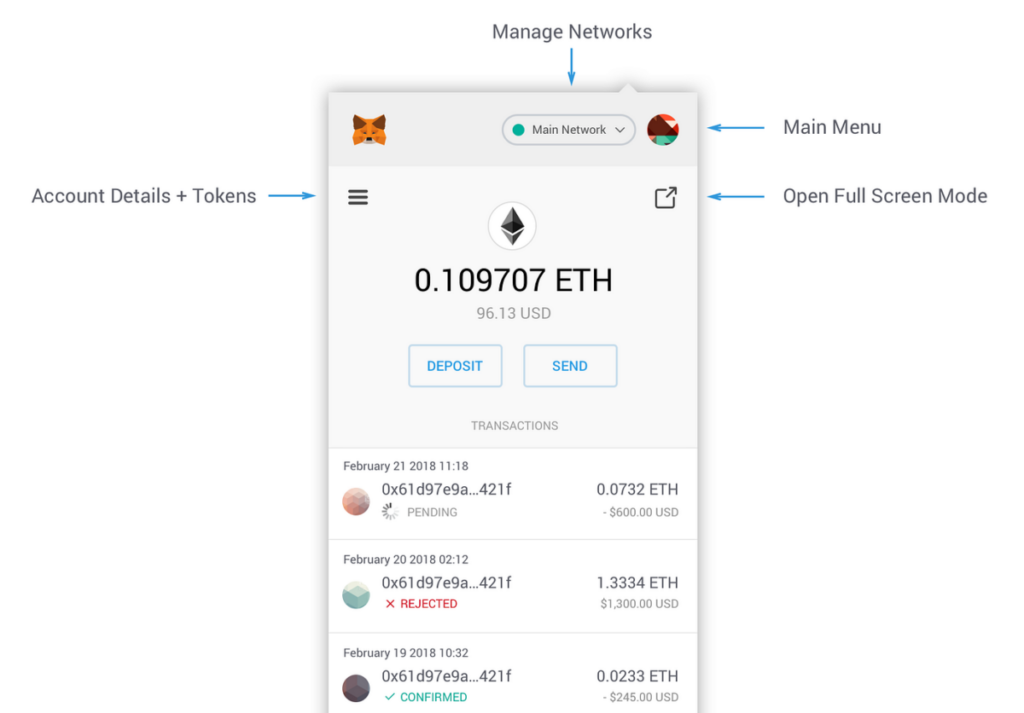
MetaMask is a non-custodial crypto wallet and a gateway to Web3. It lets you store cryptocurrency, send and receive it, and, most importantly, connect to decentralized applications (dApps): exchanges (Uniswap), NFT marketplaces (OpenSea), DeFi protocols (Aave), and thousands of others.
The wallet was developed by ConsenSys (founded by Joe Lubin, co-founder of Ethereum) and has existed for more than 10 years. The code is open-source and has undergone multiple audits.
Why MetaMask is so popular
- Web3 standard — most dApps support MetaMask first
- Multichain — Ethereum, all L2s, Solana, Bitcoin, and dozens of networks
- Everything for DeFi — swaps, bridging, staking, perps, prediction markets
- Extension + mobile app — synchronization across devices
- Hardware wallet integration — Ledger, Trezor
- Open source — transparency and community trust
What’s new in 2026
MetaMask has undergone a major transformation:
- Solana — native support from July 2025
- Bitcoin — native support from December 2025 (buy, send, receive, swaps)
- Multichain accounts — one seed phrase manages addresses across all networks (BIP-44), no need to switch manually
- MetaMask Card — spending crypto in the real world
- Built-in perps and prediction markets
- Interface redesign — simplified for beginners
Important nuance: multichain accounts do not yet apply to hardware wallets — Ledger/Trezor currently work only with EVM networks (Solana and Bitcoin are planned for them).
How to create
Registration takes 3-5 minutes. I’ll show it using the mobile app as an example (the extension works the same way).
Step 1: Download the official app
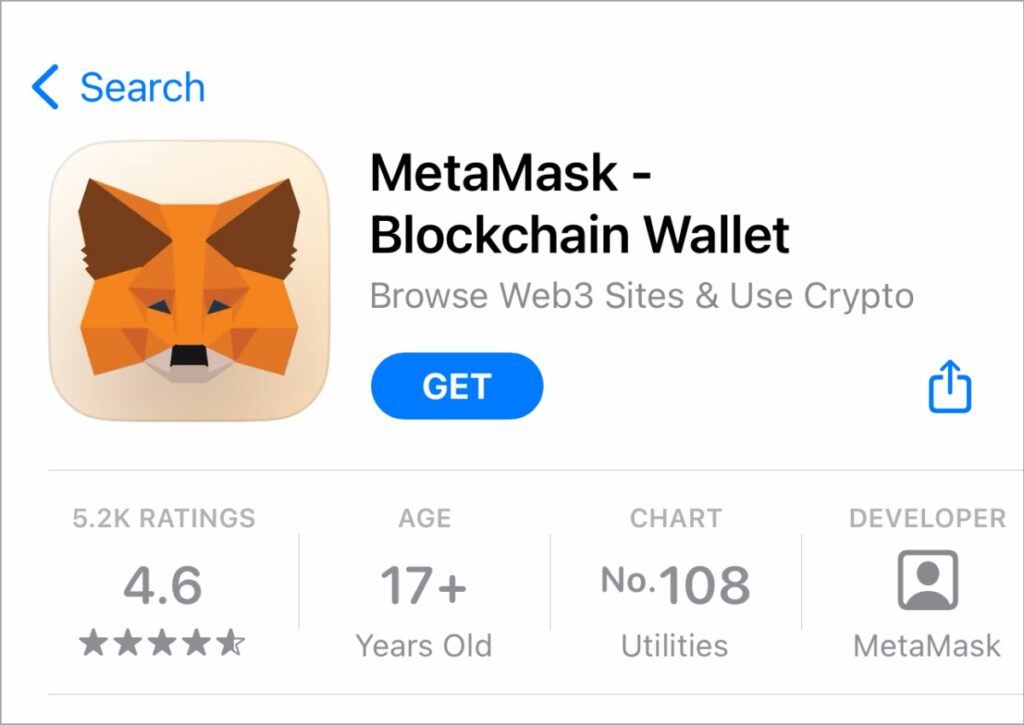
Essential: download only from official sources:
- iOS: App Store → “MetaMask”
- Android: Google Play → “MetaMask”
- Extension: only from metamask.io (Chrome, Firefox, Brave, Edge)
No links from search/ads! Phishing clone sites of MetaMask are the main reason for losing funds. Always check the URL: the official one is metamask.io (developer ConsenSys).
Step 2: Create a new wallet
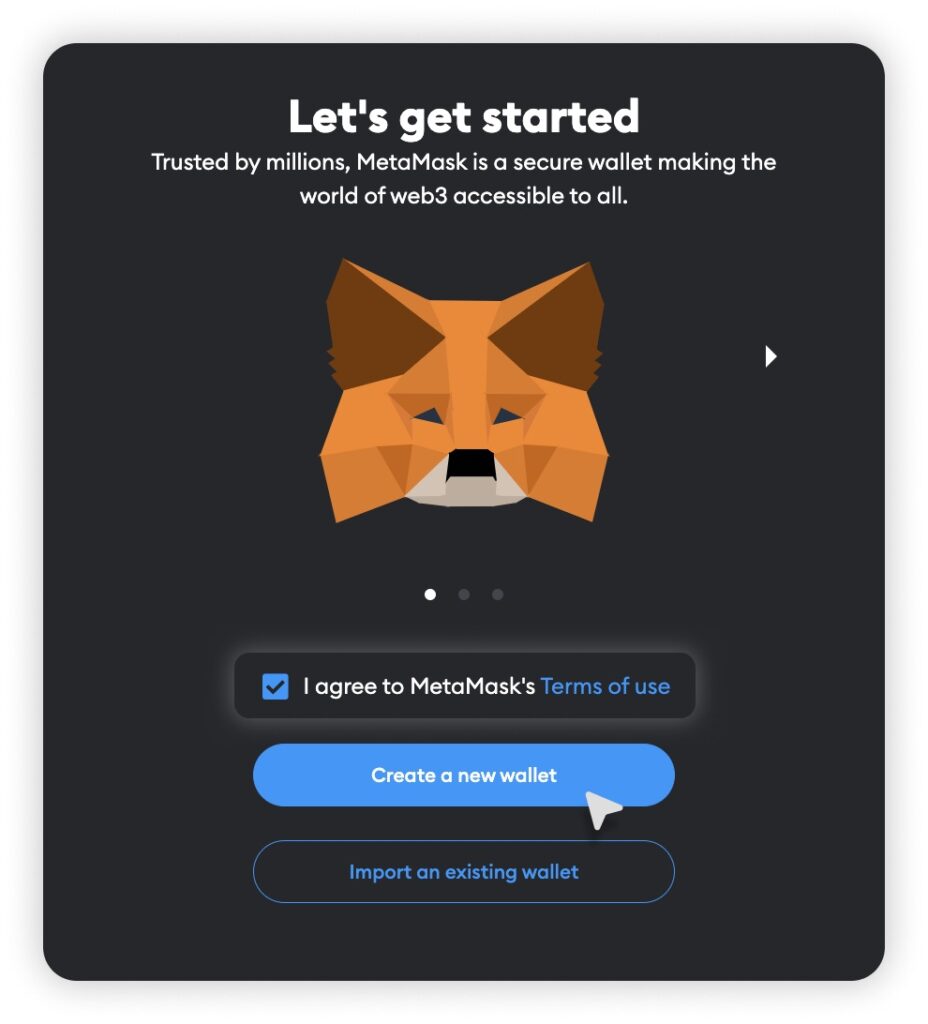
- Open the app
- Tap “Create a new wallet”
- Agree to the terms (or opt out of analytics collection — your choice)
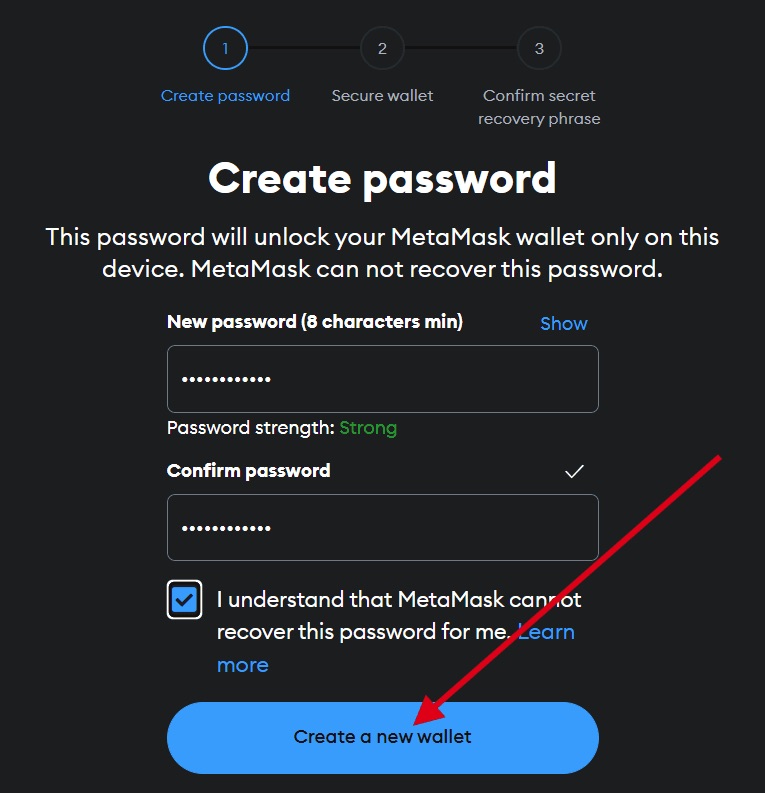
Step 3: Create a password
Come up with a strong password to access the app on this device. Enable biometrics (Face ID / Touch ID) for convenient sign-in.
Important: this password protects the wallet only on this device. It does NOT replace the seed phrase — these are different things.
Step 4: Get the seed phrase
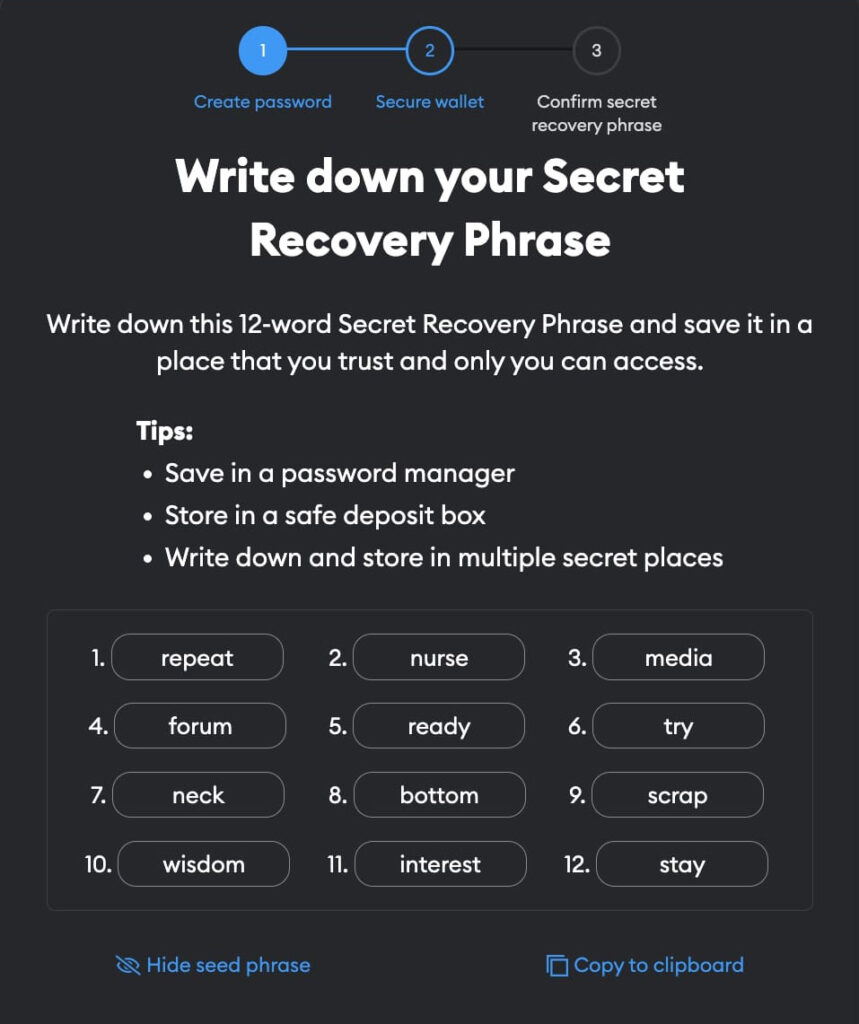
MetaMask will show your Secret Recovery Phrase — 12 words. This is the most important screen. How to save it properly is covered in the next section.
Step 5: Confirm the seed phrase
MetaMask will ask you to enter several words from the phrase in the correct order — a check that you wrote it down. After confirmation, the wallet is ready.
Done! You now have a wallet with addresses for Ethereum, Solana, Bitcoin, and other networks. Now for the most important part: protecting your seed phrase.
Seed phrase
This is the main section of the manual. Understanding the seed phrase = the safety of your money.
What is a Secret Recovery Phrase
Seed phrase (Secret Recovery Phrase, SRP, mnemonic phrase) is 12 words in a specific order that serve as the master key to the entire wallet. In 2026, thanks to the BIP-44 standard, one phrase controls addresses across all networks (Ethereum, Solana, Bitcoin, etc.).
Why the seed phrase is essential
Seed phrase = full access to the funds.
- Anyone with your seed phrase will gain control over all your assets across all networks
- If you lose your seed phrase and device, your crypto is lost forever
- MetaMask does NOT store your seed phrase and cannot recover it
- No “MetaMask support” will help — and it will never ask for it
MAIN RULE: never show your seed phrase to anyone, ever. Not to “support,” not in Telegram/Discord, and not in “wallet verification” forms. Anyone who asks for your Secret Recovery Phrase is a scammer. This is rule No. 1 in crypto.
How to store a seed phrase correctly
Write it down on paper — by hand, legibly, in the correct order (number the words)
Make 2-3 copies and store them in different secure places
Consider a metal backup (steel plate) — protection from fire/water
Double-check every word — one mistake = impossible to recover
What you must NOT do with a seed phrase
Screenshot — it will end up in the gallery and cloud, and may leak
Notes on your phone (Notes) — not secure
Message it to yourself in Telegram/messengers — account compromise = loss of crypto
Store it in the cloud in plain text (unlike Trust Wallet, MetaMask does not have a built-in encrypted cloud backup — keep it offline only!)
Text file on a PC — viruses and stealers steal such files
Entering it on any websites — MetaMask never asks you to enter a seed phrase on a web page
Important difference from Trust Wallet: MetaMask does not have an official encrypted cloud backup feature for the seed phrase. So the rule here is strict — offline storage only (paper, metal). This is even safer, but it requires care on your part.
Password vs seed phrase — don’t confuse them
| Parameter | App password | Seed phrase |
|---|---|---|
| What it’s for | Unlocking on the device | Master key to the entire wallet |
| Where it works | Only on this device | On any device/wallet |
| Can it be changed? | Yes | No (it is the primary key) |
| If forgotten | Reset via the seed phrase | Access is lost forever |
Main point: forgot the app password — no problem, you can restore access with the seed phrase. Lost the seed phrase — that’s a disaster. So the phrase is the most important thing.
How to receive
Receiving crypto in MetaMask is easy.
Step by step
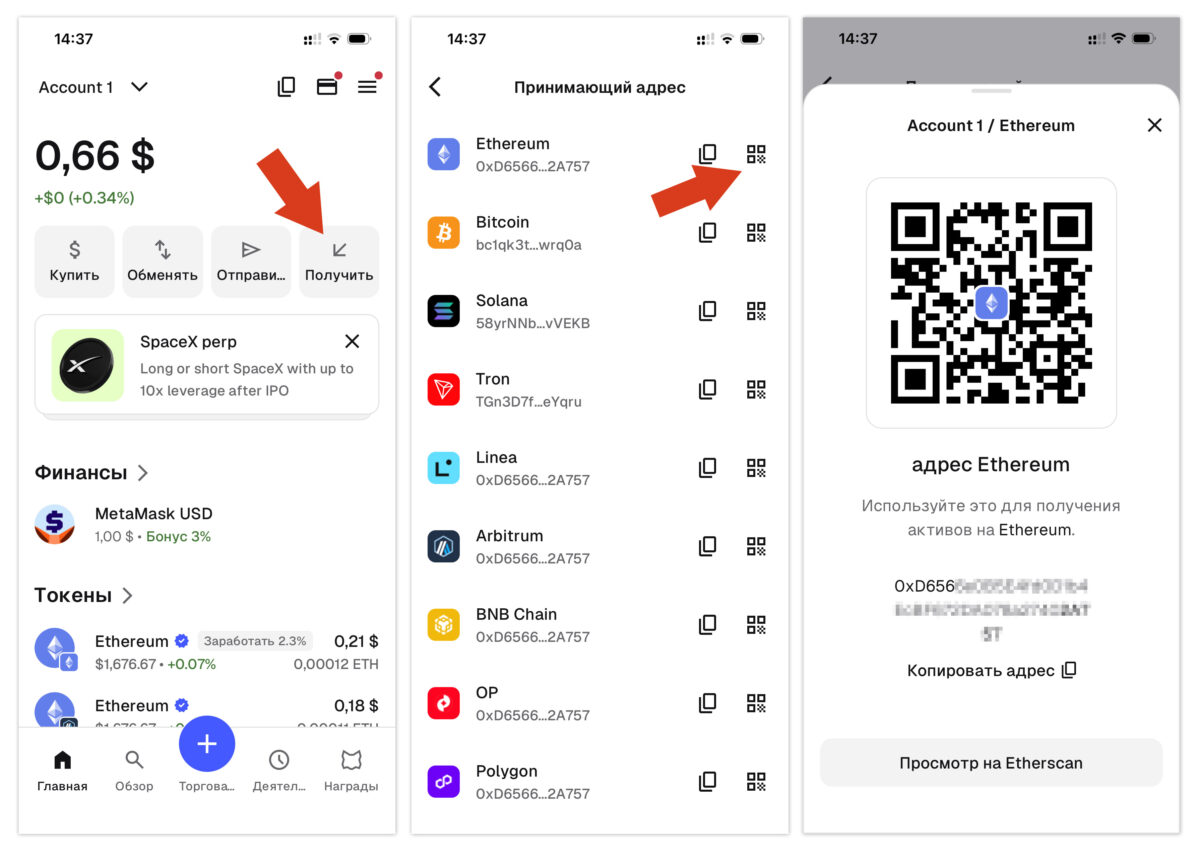
- On the main screen, tap “Receive”
- Select the network/account (Ethereum, Solana, Bitcoin, etc.)
- Your address and QR code will appear
- Copy the address or show the QR code to the sender
The main rule when receiving
The sender’s network must match the recipient’s network.
In MetaMask, one account has different addresses for different networks:
- Ethereum and all EVM networks (Polygon, Arbitrum, Base…) — the address starts with
0x... - Solana — a separate address (base58)
- Bitcoin — a separate address (starts with
bc1...or others)
If you are sent USDT on the Polygon network, choose the address for Polygon. Sending to the wrong network = loss of funds.
More about networks — in our guide USDT TRC20 vs ERC20 vs BEP20.
How to send
Step by step
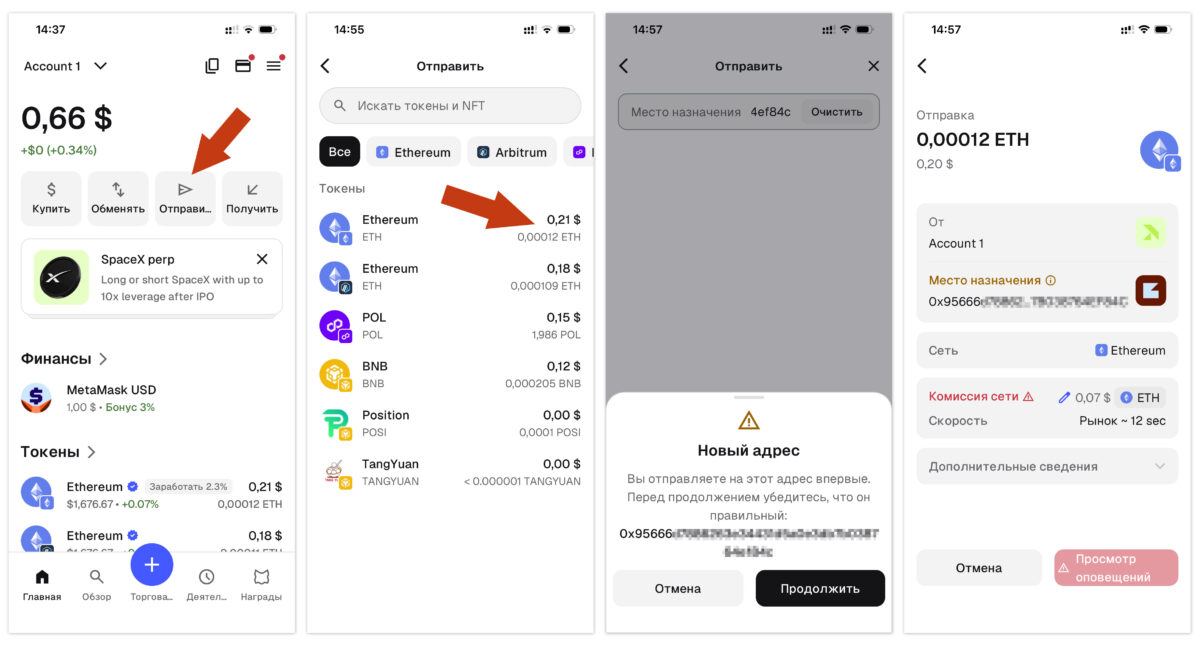
- Click “Send”
- Select the account/network and token
- Paste the recipient address (or scan the QR code)
- Enter the amount
- Check the gas fee (network fee)
- Check the address and network 3 times
- Confirm → biometrics/password
Checklist before sending
- Correct token and network?
- Address copied in full and correctly?
- Enough native token for gas? (ETH for Ethereum, SOL for Solana, MATIC for Polygon, BTC for Bitcoin)
- For a new address — a small test amount?
About gas: on the Ethereum network, fees (gas) can be high during peak traffic hours. If a transaction is “stuck,” it is often due to low gas. MetaMask allows you to speed up (Speed Up) or cancel (Cancel) a pending transaction.
Tip: when making the first transfer to a new address, send a test amount ($1-5). Make sure it arrives, then send the rest.
Swaps and bridging
MetaMask has built-in exchange tools.
Swap (token exchange)
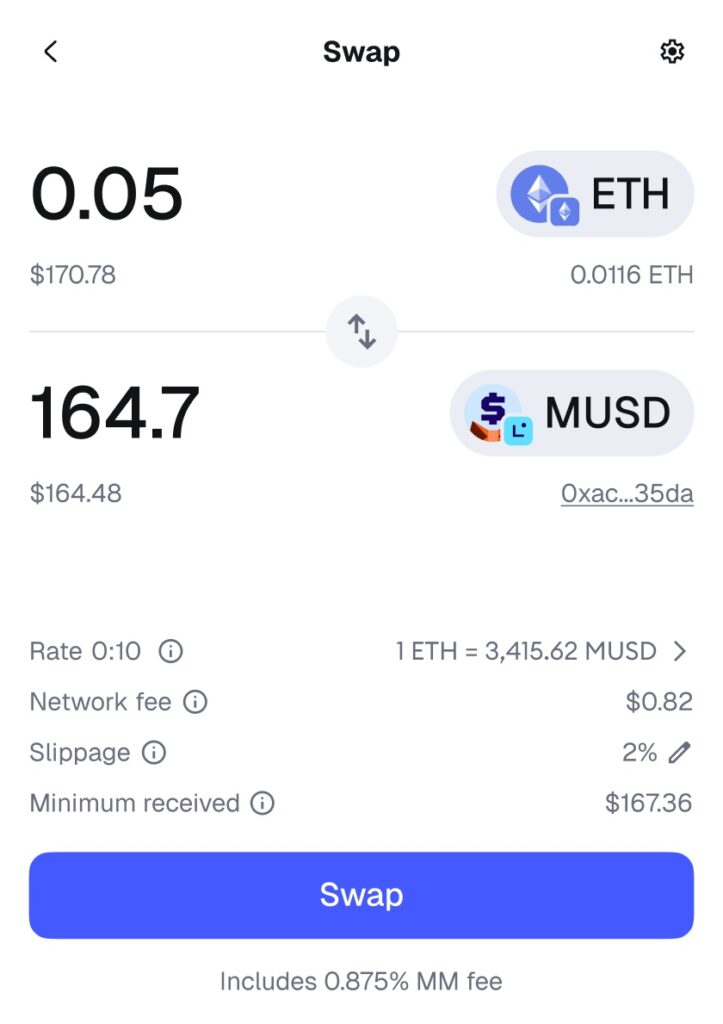
Exchange one token for another without leaving the wallet:
- Click “Swap”
- Select the “send” and “receive” tokens
- Enter the amount
- Check the rate and fee
- Confirm
MetaMask is an aggregator: it looks for the best rate across different DEXs. The service fee is 0.875% (clearly disclosed, not hidden in the spread) plus network gas.
Bridge (moving between networks)
Through the Portfolio dashboard, you can move assets between networks (for example, USDC from Ethereum to Arbitrum). This is called bridging.
Swaps and bridging are convenient for one-time transactions. For large amounts, compare the rate with a centralized exchange.
dApps and DeFi
MetaMask’s main superpower is connecting to Web3 applications.
How to connect to a dApp
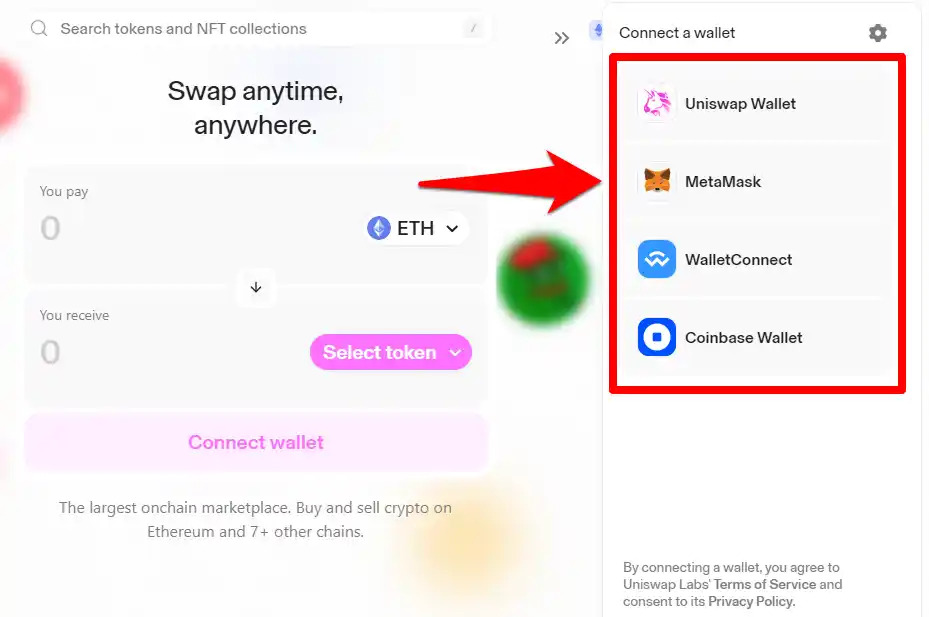
- Open the dApp (for example, Uniswap, Aave, OpenSea) in the MetaMask browser or through the extension
- Click “Connect Wallet” on the dApp website
- Select MetaMask
- Confirm the connection in the wallet
- You can now trade, stake, and mint NFTs
The main dApp security rule
When a dApp asks you to confirm a transaction, carefully read exactly what you are signing. Malicious dApps may request unlimited access (approval) to your tokens.
MetaMask shows Security alerts — warnings about suspicious transactions. Do not ignore them.
Periodically check and revoke unnecessary approvals through revoke.cash or MetaMask settings. Old permissions are a common cause of hacks.
Security
Honest breakdown: MetaMask is reliable, but it is a hot wallet.
What makes MetaMask secure
- Non-custodial — the keys are only yours, on your device
- Open source — audited multiple times over 10+ years
- Security alerts — warnings about malicious transactions by default
- Integration with Ledger/Trezor — you can store keys on a hardware wallet
- Biometrics + password — app protection
Real risks (honestly)
This is a hot wallet — connected to the internet, so it is vulnerable to:
- Phishing — fake MetaMask websites, fake “support”
- Malicious approvals — signing a dangerous transaction in a scam dApp
- Stealers — malware that steals data from a device
- Browser/phone compromise
Special expansion risk: the browser extension operates in a browser environment with many threats (fake extensions, malicious websites). Be especially careful.
Golden Rules of Security
- Never show your seed phrase to anyone — never, under any circumstances
- Download only from metamask.io and official stores
- Check the URL of the dApp before connecting
- Read transactions before signing — do not ignore Security alerts
- Revoke old approvals periodically
- For large amounts — connect Ledger/Trezor
- Use a separate wallet for risky dApps (a “hot” wallet with a small amount)
- Do not keep all your funds in one hot wallet
Pro strategy: a main wallet with Ledger for storage + a separate “spending” MetaMask wallet with a small amount for experimenting with new dApps. That way, a dApp hack won’t affect your main capital. More details in the wallet ranking.
Comparison
How MetaMask compares with competitors in 2026.
| Parameter | MetaMask | Trust Wallet | Phantom |
|---|---|---|---|
| Focus | Web3, DeFi, EVM | Multichain, mobile | Solana (+ EVM) |
| Best at | dApps, Ethereum L2 | Simplicity, 100+ networks | Solana ecosystem |
| Solana | ✅ (since 2025) | ✅ | ✅ (native, best UX) |
| Bitcoin | ✅ (since 2025) | ✅ | ✅ |
| DeFi/dApp | 🥇 Best | Good | Good (Solana) |
| Extension | ✅ | ✅ | ✅ |
| Hardware | Ledger, Trezor | Ledger | Ledger |
| For whom | DeFi users, Ethereum | Beginners, multichain | Solana users |
Key takeaways
- MetaMask — if you work with DeFi, dApps, Ethereum, and L2. The Web3 benchmark
- Trust Wallet — if you want simplicity and multichain support on your phone. Review
- Phantom — if your main world is Solana
Many people use multiple wallets for different purposes — that’s normal.
FAQ
Is MetaMask safe in 2026?
Yes, MetaMask is considered a reliable non-custodial wallet — the keys are stored only on your device, the code is open source and has undergone multiple audits over 10+ years. Security alerts are included, and there is integration with Ledger/Trezor. But it is a hot wallet, so the risks of phishing, malicious approvals, and stealers remain. For large amounts, connect a hardware wallet. The main protection is proper storage of the seed phrase and caution with dApps.
What happens if I lose my MetaMask seed phrase?
If you lose your Secret Recovery Phrase AND access to your device, your cryptocurrency will be lost forever. MetaMask does not store seed phrases and cannot restore access — that is the essence of a non-custodial wallet. Unlike Trust Wallet, MetaMask does not have an encrypted cloud backup, so it is essential to write down the 12 words on paper, make several copies, and store them offline in secure locations.
Can MetaMask seed phrase be stored in the cloud?
Not recommended. Unlike Trust Wallet, MetaMask does not have a built-in encrypted cloud backup feature. Storing the seed phrase in a regular cloud service (screenshot, note) is dangerous: if the cloud account is compromised, the thief will gain access to all funds. The safe method is offline only: paper in a secure place or a metal plate (protection against fire and water). Make 2-3 copies and keep them in different locations.
How much does it cost to use MetaMask?
MetaMask itself is free — there are no fees for creating, storing, sending, or receiving. You only pay the network gas (the blockchain fee). For built-in MetaMask swaps, there is a 0.875% service fee (clearly disclosed), plus gas. Buying crypto with a card is handled through third-party providers with their own fees. Downloading and creating a wallet are completely free.
Which blockchains does MetaMask support in 2026?
MetaMask supports Ethereum and all EVM-compatible networks (Polygon, Arbitrum, Optimism, Base, BNB Chain, Avalanche, etc.), as well as native Solana (since July 2025) and Bitcoin (since December 2025), plus Tron, Monad, and Sei. Through multichain accounts, one seed phrase manages the addresses of all these networks. For very exotic networks, you can use Snaps (extensions). In 2026, MetaMask continues to add new networks.
How is MetaMask different from Trust Wallet?
Both are non-custodial hot wallets. MetaMask is more focused on DeFi, dApps, and the Ethereum ecosystem; it is a benchmark for Web3 interaction and is especially strong for browser-based operations. Trust Wallet is more mobile-friendly and simpler, with an emphasis on broad multichain support (100+ networks) and ease of use for beginners. MetaMask is better for active work with DeFi and Ethereum L2; Trust Wallet is better for simple storage and multichain use from a phone. Another difference: Trust Wallet has encrypted cloud backup, while MetaMask does not.
What are multichain accounts in MetaMask?
This is a 2025–2026 update that makes it possible to manage addresses across different blockchains (Ethereum, EVM L2, Solana, Bitcoin) from a single account using one seed phrase (according to the BIP-44 standard). Previously, you had to switch networks manually and maintain separate settings; now one account displays and manages addresses across all networks. This simplifies working with a multichain portfolio. Important: for hardware wallets (Ledger/Trezor), this currently applies only to EVM networks.
Is it safe to connect MetaMask to dApps?
Connecting itself is safe, but caution is important. When you connect, the dApp sees your public address and balance (this is normal). The danger lies in signing transactions: a malicious dApp may request unlimited access (approval) to your tokens. Always read what you are signing, do not ignore MetaMask security alerts, check the dApp URL, and periodically revoke old approvals through revoke.cash. For risky dApps, use a separate wallet with a small amount of funds.
Conclusion
MetaMask in 2026 remains the best Web3 wallet for anyone actively working with DeFi, dApps, NFT, and the Ethereum ecosystem. With the addition of native support for Solana and Bitcoin, multichain accounts, and MetaMask Card, it has evolved from an “Ethereum extension” into a full-fledged multichain hub.
Key takeaways:
✅ MetaMask = the Web3 standard for DeFi, dApps, and Ethereum L2
✅ Download only from metamask.io and official stores
✅ Seed phrase = your money — write it on paper, store it offline
✅ MetaMask has no cloud backup — only offline storage of the phrase
✅ Check the network when sending/receiving
✅ Read transactions in the dApp, do not ignore Security alerts
✅ Revoke old approvals periodically
⚠️ This is a hot wallet — for large amounts, connect Ledger/Trezor
MetaMask is your passport to the world of Web3. If you plan not just to store crypto, but to actively use it — trade on DEXs, farm in DeFi, mint NFTs, and connect to new protocols — it is an indispensable tool. The main thing is to treat the seed phrase seriously and handle dApps with caution.
Starting your crypto journey? Check out our guides: how to buy Bitcoin in Ukraine, Trust Wallet review, USDT networks, and Top 10 crypto wallets of 2026.