Cake Wallet is a non-custodial open-source wallet that grew out of the first mobile wallet for Monero. In 2026, it is a multi-currency hub: ~17 networks, no-KYC swaps, fiat purchases, payments via Cake Pay, and hardware wallet support. Its strengths are deep privacy (Tor/I2P, Silent Payments, MWEB) and full control over private keys. Its drawbacks are that it is a “hot” wallet, swap fees depend on providers, and there have been few recent audits. It is ideal for those who hold Monero and BTC and prioritize privacy over convenience.
Cake Wallet is a non-custodial open-source wallet that grew out of the first mobile wallet for Monero. In 2026, it is a multi-currency hub: ~17 networks, no-KYC swaps, fiat purchases, payments via Cake Pay, and hardware wallet support. Pros include deep privacy (Tor/I2P, Silent Payments, MWEB) and full control over keys. Cons: it is a “hot” wallet, swap fees depend on providers, and there have been few recent audits. Ideal for those who hold Monero and BTC and prioritize privacy over convenience.
- What Cake Wallet Is and Why Users Trust It
- Which Cryptocurrencies Cake Wallet Supports
- Monero Privacy: Where the Catch Lies
- Bitcoin, Litecoin, and network anonymity
- Built-in exchange, buying and selling
- Cake Pay: how to spend crypto in real life
- Bonus Features
- Platforms and hardware wallets
- Getting started and backup
- Cons and Risks
- Cake Wallet vs. Alternatives
- Who Cake Wallet Is For
- FAQ
What Cake Wallet Is and Why Users Trust It
Cake Wallet is a free, open-source, non-custodial wallet. It was launched in January 2018 by Vikrant Sharma as the first open-source Monero wallet for iOS and is developed by the Cake Labs team. The code is available on GitHub under the MIT license, so anyone can inspect it for backdoors. According to the project, its user base has surpassed 1,000,000.
“Non-custodial” is the key word. The seed phrase and private keys are generated and stored only on your device. Neither Cake Labs, nor an exchange, nor the tax authorities have access to the funds or can freeze the account. The trade-off is full responsibility for backups: support can help with sync issues and bugs, but it cannot recover funds if you lose your seed.
Which Cryptocurrencies Cake Wallet Supports
Around 17 blockchains plus tokens across several networks. The lineup differs by platform, with mobile versions receiving new assets first.
| Category | Coins and Networks |
|---|---|
| Privacy coins | Monero (XMR), Zcash (ZEC), Wownero, Zano, Decred |
| Major coins | Bitcoin, Ethereum, Litecoin, Bitcoin Cash, Dogecoin, Nano |
| EVM networks | Polygon, Base, Arbitrum, BNB Smart Chain |
| Other | Solana, Tron |
| Tokens | ERC-20, BEP-20, SPL (Solana), TRC-20 (Tron) |
Monero Privacy: Where the Catch Lies
Most users come to Cake Wallet specifically for XMR, and this is where it excels. Subaddresses are generated automatically (each transaction gets its own address), view-only wallets are supported (so you can monitor the balance without spending rights), and background syncing is available so you do not have to wait for the blockchain to finish loading manually.
Read also: Monero (XMR): what it is, how privacy works, risks
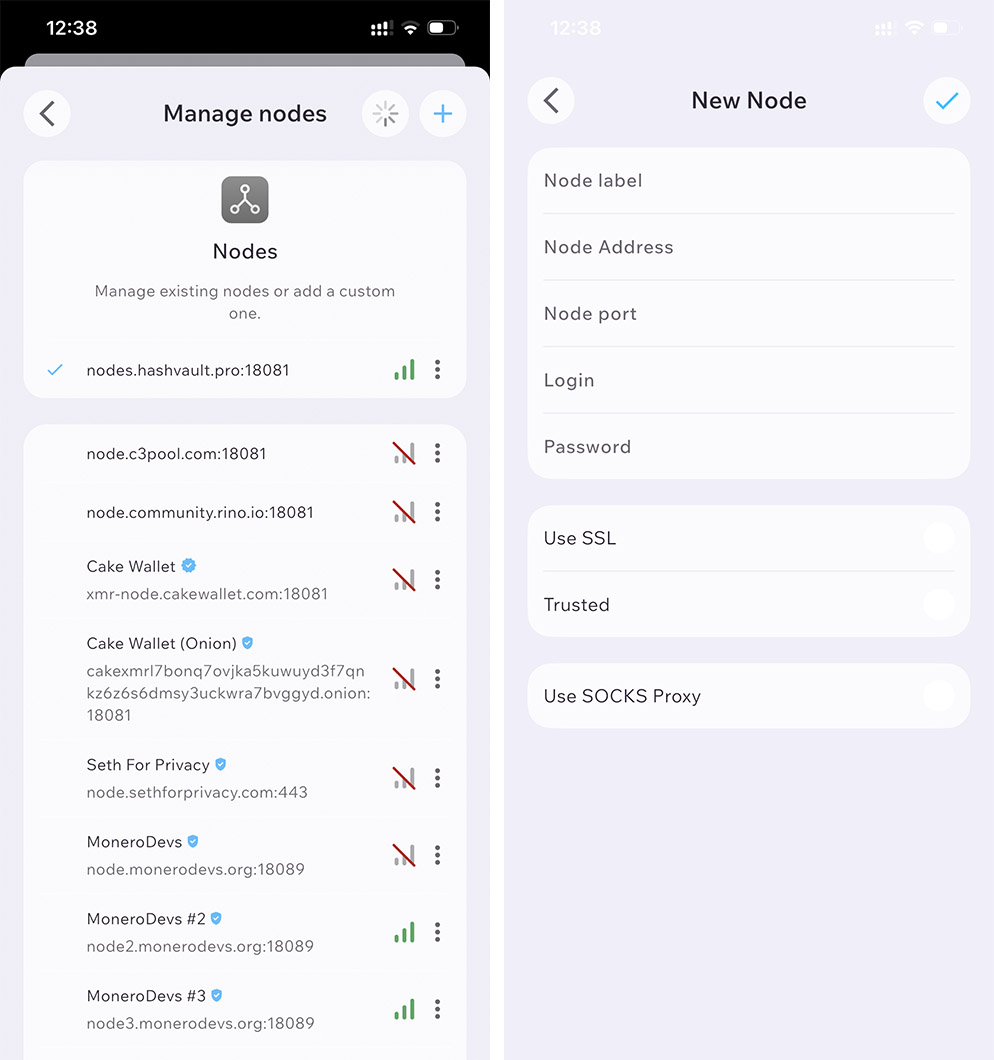
But there is one nuance that superficial reviews stay silent about: node selection. By default, the wallet connects to a remote node. Monero itself hides the amounts, sender, and recipient even from the node, but the remote node can still see your IP address and the timing of your requests. This is the weak link in privacy. There are three solutions, in increasing order of anonymity:
- Remote node by default — convenient, but the node can see your IP.
- .onion node via Tor — IP hidden, a balance between convenience and privacy.
- Your own node — maximum privacy, but requires storage space and time for synchronization.
This is the most important practical tip for Monero in Cake Wallet: if privacy is essential, don’t leave the default node in place — switch to a .onion node or run your own.
Bitcoin, Litecoin, and network anonymity
For transparent networks, the wallet also provides tools: Silent Payments (BIP352) for Bitcoin (receiving to a static address without exposing transaction history), MimbleWimble (MWEB) for Litecoin, Payjoin and coin control — manual UTXO management for address hygiene. At the network level, routing through Tor and I2P masks the IP address when broadcasting transactions.
It is important to understand the limit: a transparent blockchain remains transparent. Even with Tor and Silent Payments, BTC transactions are still subject to on-chain analysis. The only truly private coin here is Monero — everything else merely reduces the traces.
Built-in exchange, buying and selling
Cake Wallet is not just a storage solution, but a mini exchange:
- KYC-free swaps via third-party providers (ChangeNOW, SideShift, etc.) — for example, BTC → XMR directly in the app. No verification is required at the wallet level; a partner may require KYC for fiat transactions.
- Buying with fiat by card, SEPA transfer, or Apple Pay — availability depends on the region, and the spread is noticeable.
- “Pay Anything” — pay a recipient in one coin using funds in another through a background exchange.
- Bitcoin Lightning — instant, low-cost BTC payments.
About fees. The app is free and does not charge a fixed fee — you pay network fees, the exchange spread, and partner commissions. The built-in swap is approximately 0.4–1.5% all-in. For large transactions, compare the quote with the external market: the real price including the spread is often higher than shown — this is a common user complaint.
Cake Pay: how to spend crypto in real life
A separate and underrated feature. Cake Pay lets you buy gift cards and prepaid cards with crypto so you can pay where crypto is not accepted directly. Key facts:
- Cards at face value — $20 costs $20, with only a very small cryptocurrency conversion fee added.
- What’s available: virtual prepaid Mastercard, Visa Reward, gift cards from hundreds of retailers (Amazon, Target, Starbucks, Best Buy, etc.). The selection and availability depend on the country selected.
- Limit — up to $5,000 per day per user; codes are sent to the specified email address.
Card providers change periodically, so check the country-specific selection directly in the app.
Bonus Features
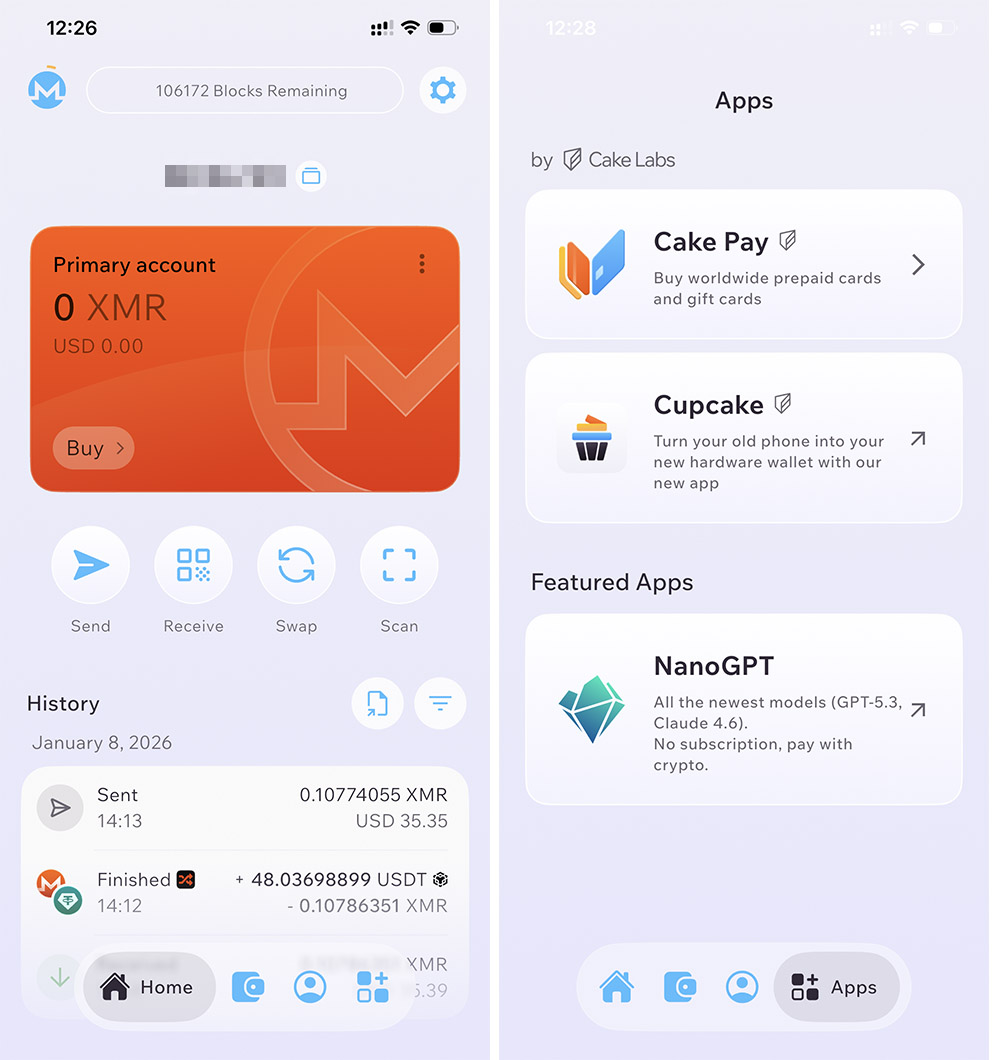
- Nano GPT — pay for access to AI models (including GPT and Claude) with cryptocurrency directly from your wallet, with no subscriptions or card linking.
- Cupcake — a companion app that turns an old smartphone into an air-gapped “signer” (offline device) for large amounts.
Platforms and hardware wallets
Works on Android, iPhone, iPad, macOS, Linux, and Windows; a single seed phrase provides access across different devices. There is no browser extension, which is a drawback for active DeFi and dApp use.
Hardware wallets: Ledger, Trezor (including Safe), BitBox, separate flows for Coldcard Q, plus integration with Cupcake. Connection options include USB, Bluetooth (for some Ledger flows), or QR during signing/recovery. Support depends on the device, asset, and platform.
Getting started and backup
- Download only from cakewallet.com, the App Store, or Google Play — there are many phishing copies.
- Set a PIN, create a wallet, and write the seed down on paper.
- Seed types: Monero — 16-word Polyseed by default or 25-word legacy; BTC/LTC — 12/24 words (BIP39); “Wallet Groups” — one 12-word BIP39 phrase for multiple assets.
- Back up only offline — no cloud storage, messengers, or screenshots.
- When restoring, specify the seed + block height or date — synchronization will be faster.
Cons and Risks
- This is a “hot” wallet. For large long-term holdings, use a hardware wallet or a setup paired with Cupcake.
- Historical BTC vulnerability. Versions up to v4.1.7 generated weak 12-word Bitcoin wallets (insufficient randomness → seed overlap and losses). If you created a BTC wallet on an older version, move your funds to a new one.
- Exchange functionality depends on third parties — fees, delays, and quote failures.
- Few recent public audits (open sources only show a review of Inference AG’s multisignature implementation from late 2021).
- BTC remains pseudonymous, and Monero synchronization is rather demanding for older phones.
Cake Wallet vs. Alternatives
| Wallet | Platforms | Monero | Multi-currency | Key feature |
|---|---|---|---|---|
| Cake Wallet | Mobile + desktop | ✅ full | ✅ ~17 networks | Privacy + exchange + Cake Pay |
| Monerujo | Android | ✅ full | ❌ XMR only | Lightweight XMR wallet |
| Feather | Desktop | ✅ full | ❌ XMR only | For advanced users |
| Trust Wallet | Mobile + extension | ❌ no | ✅ many networks | DeFi/dApp, no XMR |
| Exodus | Mobile + desktop | ❌ no | ✅ many networks | Ease of use, no XMR |
Who Cake Wallet Is For
Yes: you hold XMR and BTC, value privacy and control of your keys, and want exchange and payments in one app. No: you need an ultra-simple wallet, you live in DeFi through a browser extension, or you store large amounts and want hardware isolation by default.
FAQ
Is Cake Wallet safe? For everyday use — yes: the code is open-source, the wallet is non-custodial, and you control the keys. But it is a hot wallet: security depends on backing up your seed, choosing a node, and your network habits. Large amounts belong on a hardware wallet.
Is KYC required? At the wallet level — no. Verification may be requested by a third-party partner when buying/selling for fiat.
How much does it cost and what are the fees? The app is free. You pay network fees, exchange spread, and partner fees; the built-in swap is approximately 0.4–1.5%. Cake Pay cards are sold at face value plus a micro conversion fee.
Is this the best wallet for Monero? One of the best mobile options in 2026. For desktop, advanced users look at Feather; on Android — Monerujo.
Can you connect a hardware wallet? Yes: Ledger, Trezor, BitBox, separate Coldcard Q flows, and offline signing via Cupcake.