GoLogin is often the first antidetect browser people try: it has a permanent free plan, a simple interface and paid plans that start with small profile counts. This GoLogin review explains what the browser does, how its pricing model works according to the official page, where it is strong and what to keep in mind before relying on it for valuable accounts.
Key points
- GoLogin is an antidetect browser built on its own Chromium-based browser, Orbita, with cloud browsing and an Android app.
- The free plan includes 3 profiles, without profile sharing or team members.
- Paid plans are sold by number of profiles, from 10 on Professional to 100,000 on Custom.
- Annual billing gives 50% off, and there is a 7-day trial. The official page does not label all its prices, so check your exact price there.
GoLogin review: quick verdict
GoLogin is a good place to start multi-accounting: you can learn on the free plan and move to a small paid plan when you need more profiles. Its fingerprints are good for everyday tasks. For high-value accounts, test it carefully against premium tools before scaling.
| Parameter | GoLogin |
|---|---|
| Type | Antidetect browser on its own Chromium-based browser, Orbita |
| Best for | Beginners, solo users, small teams |
| Free plan | 3 profiles, no sharing and no team members |
| Paid plans | Professional, Business, Enterprise and Custom |
| Extras | Cloud browsing, an Android app, residential proxy traffic in paid plans |
| Weak spot | Unlabeled prices and limits on the official pricing page |
What GoLogin is
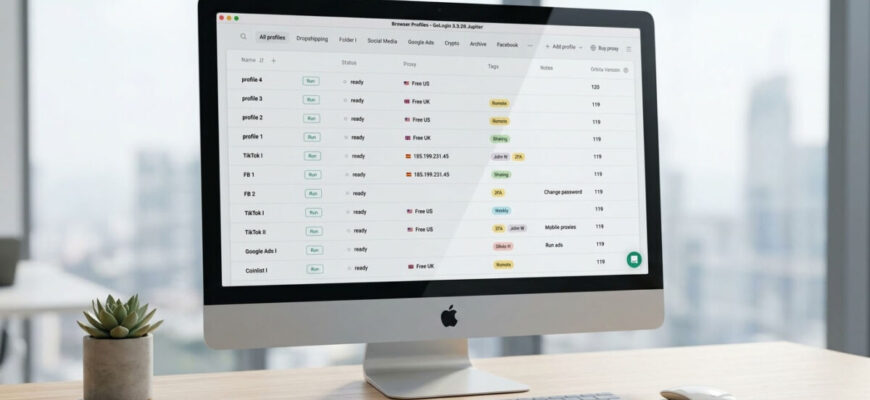
GoLogin runs isolated browser profiles, each with its own fingerprint, cookies and proxy. Platforms see separate devices instead of one user with many accounts. If you are new to the topic, start with our guide what is an antidetect browser.
The browser behind the profiles is Orbita, GoLogin’s own Chromium-based build. Profiles can be launched locally or in the cloud, which helps when you work from a weak computer or need to share profiles with a team. GoLogin also has an Android app.
Fingerprints
GoLogin replaces the main fingerprint parameters, including user agent, canvas, WebGL, fonts, time zone and hardware data, and keeps them consistent within a profile. Its fingerprints are good for everyday multi-accounting. When you create many profiles, make sure they do not look too similar to each other: check new profiles with services such as BrowserLeaks or CreepJS and watch account behaviour on your platforms before scaling.
How GoLogin pricing works
According to the official pricing page, checked on November 2, 2026:
| Parameter | What the official page says |
|---|---|
| Free plan | 3 profiles, no profile sharing and no team members |
| Professional | 10 to 100 profiles |
| Business | 300 or 500 profiles |
| Enterprise | 1,000 profiles |
| Custom | 2,000 to 100,000 profiles |
| Billing discount | 50% for annual billing |
| Trial | 7 days |
| Included in paid plans | Residential proxy traffic, cloud browsing, cloud launches and a REST API with limits that grow on higher plans |
We do not quote a single price. The official page shows two prices for each plan without labelling which one is monthly and which annual, and the comparison table does not name its columns. Check the current price for your number of profiles on the official page before paying.
Pros and cons
Pros
- Permanent free plan with 3 profiles
- Small paid plans for solo users
- Cloud browsing and cloud launches
- Android app
- 50% discount for annual billing and a 7-day trial
Cons
- Prices and limits on the official page are not clearly labelled
- Free plan without profile sharing or team members
- Fingerprints need careful testing for high-value accounts
- Larger teams move to the more expensive Business and Enterprise plans
Security and account hygiene
Enable two-factor authentication, use a unique password for your GoLogin account and give team members access only to the profiles they need. Do not keep wallet seed phrases or other irreplaceable secrets in browser profiles. Give each profile its own clean proxy that matches the profile’s location, as explained in our guide to proxies for multi-accounting, and warm up new accounts gradually: see our account warm-up guide.
How GoLogin compares
- AdsPower has a smaller free plan but more built-in automation for teams. See our AdsPower review.
- Multilogin adds a Firefox-based engine and Android cloud phones. See our Multilogin review.
- Octo Browser has no free plan and focuses on fingerprints. See our Octo Browser review.
- For a side-by-side comparison, see our ranking of the best antidetect browsers.
FAQ
Is GoLogin free?
Yes. GoLogin has a permanent free plan with 3 profiles. It does not include profile sharing or team members.
How much does GoLogin cost?
The price depends on the number of profiles and the billing period; annual billing is 50% cheaper. The official page does not clearly label monthly and annual prices, so check the price for your plan there before paying.
Does GoLogin include proxies?
According to the official page, paid plans include some residential proxy traffic. For serious work, most users still buy dedicated proxies, one per profile.
Can I use GoLogin on a phone?
GoLogin has an Android app, and profiles can also be launched in the cloud. For heavy work in mobile apps, a real Android cloud phone is a stronger option.
Is GoLogin good for beginners?
Yes. The free plan, simple interface and small paid plans make it a convenient tool to learn multi-accounting before investing in larger subscriptions.
Bottom line
GoLogin is a convenient way to start: a permanent free plan, small paid plans, cloud launches and an Android app. Its pricing page is not clearly labelled, so confirm the price for your configuration before paying. If you need team automation or premium fingerprints, compare it with other tools in our ranking of the best antidetect browsers.
Facts checked on November 2, 2026.