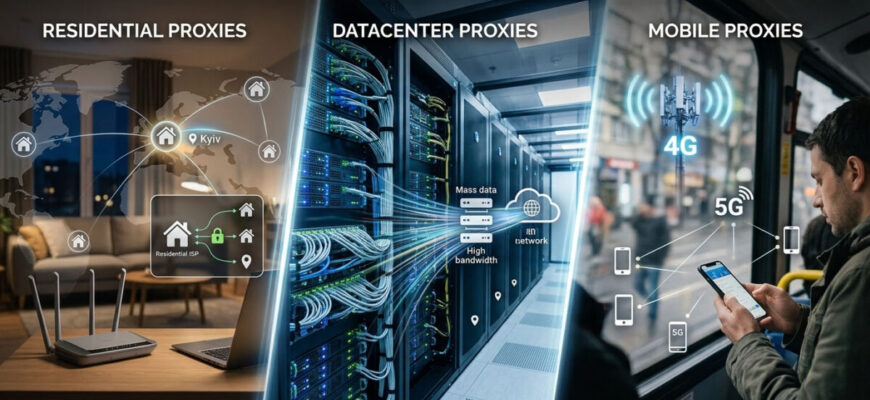
Not all proxies are the same, and choosing the wrong type means either overpaying or getting accounts restricted. The three main types, residential, datacenter and mobile, plus a fourth worth knowing, ISP, differ in where the IP comes from, how easily websites recognise it, how fast it is and what it costs. This residential vs datacenter vs mobile proxies guide explains each type in plain language and shows which one fits scraping, advertising work and multi-accounting.
In short
- Residential proxies are the default for account work: real home IPs, low detection risk, billed per GB.
- Datacenter proxies are the cheapest and fastest but are easily recognised; use them only where detection does not matter.
- Mobile proxies are the most trusted and the most expensive; they suit the strictest platforms.
- ISP proxies give a stable IP that looks residential, which suits long-lived accounts.
- Residential vs datacenter vs mobile proxies: the quick answer
- Datacenter proxies
- Residential proxies
- Mobile proxies
- ISP proxies, the fourth type
- How much each type costs
- How to choose for multi-accounting
- FAQ
- What is the difference between residential and datacenter proxies?
- Are mobile proxies better than residential ones?
- Which proxy type is best for multi-accounting?
- What are ISP proxies?
- How much do the different proxy types cost?
- Do I still need an antidetect browser with residential proxies?
- Bottom line
Residential vs datacenter vs mobile proxies: the quick answer
| Type | IP source | Detection risk | Speed | Typical billing | Best for |
|---|---|---|---|---|---|
| Datacenter | Servers of hosting and cloud providers | High | Highest | Per IP per month, the cheapest | Non-sensitive scraping, price checks, internal tools |
| Residential | Home internet connections | Low | Medium | Per GB | Multi-accounting, protected websites |
| Mobile | 4G/5G mobile carriers | The lowest | Medium, depends on the network | Per GB or per port, the most expensive | The strictest platforms, account farming |
| ISP (static residential) | Data center servers with IPs registered to internet providers | Low | High | Per IP per month | Long-lived accounts that need a stable IP |
For multi-accounting the short version is: residential by default, mobile for the strictest platforms, ISP when you need a stable residential-looking IP and datacenter only where detection does not matter.
Datacenter proxies
What they are. IP addresses of servers in data centers: cloud platforms and hosting companies. They are not tied to any household or mobile carrier.
Pros. The cheapest and fastest option, often sold per IP with a large monthly traffic allowance. Good when raw speed and volume matter.
Cons. The easiest type to recognise and block. Hosting IP ranges are public knowledge, so any website with decent anti-fraud protection can flag them. Shared datacenter IPs also carry a “bad neighbour” risk: someone else’s abuse gets the address blocked.
Use for scraping websites that do not fight bots, internal tools, price checks and any task where detection really does not matter. Avoid for accounts on Meta, Google, TikTok, Amazon and other platforms with strict anti-fraud systems.
Residential proxies
What they are. IP addresses that internet providers assign to home connections. Traffic goes through the devices of users who agreed to share their bandwidth, so to a website it looks like an ordinary person browsing from home.
Pros. Hard to recognise because the addresses are genuine home IPs. Pools are large, cover most countries and often allow city-level targeting. This balance of trust and price made residential proxies the standard for multi-accounting, ad verification and scraping of protected websites.
Cons. More expensive than datacenter proxies, usually billed per gigabyte rather than per IP, and slower. Pool quality varies: a huge pool of already flagged IPs is worse than a smaller filtered one. Sourcing also matters: in 2026 Google and the FBI acted against the NetNut network, which, according to Google, was built on compromised home devices. Buy from providers that explain where their IPs come from.
Use for the default choice for multi-accounting and most account work, as well as scraping protected websites. Pair them with an antidetect browser, one proxy per profile; how to set this up is explained in our guide to proxies for multi-accounting. Our NodeMaven review looks at a provider that filters its residential IPs before handing them out.
Mobile proxies
What they are. IP addresses of 4G and 5G mobile carriers assigned to real phones and modems on cellular networks.
Pros. The most trusted IP type. Carriers use carrier-grade NAT (CGNAT): a small set of public IPs is shared by many real subscribers. Blocking such an address risks blocking ordinary users, so platforms treat mobile traffic carefully. This makes mobile proxies the strongest choice for the strictest platforms and for account farming, where even residential IPs meet friction.
Cons. The most expensive type, billed per gigabyte or per port (a dedicated modem), and speed and stability depend on the cellular connection.
Use for account farming, the strictest social platforms and any account you cannot afford to lose. For ordinary tasks they are overkill.
ISP proxies, the fourth type
What they are. A hybrid: servers in data centers with IP addresses registered to internet providers. They combine the trust of a residential IP with the speed and stability of a server, and they are static, so the IP does not rotate.
Pros. Fast and stable like datacenter proxies, but residential-looking to websites. The IP stays the same, which suits an account that should always log in from the same place.
Cons. Billed per IP, so not the cheapest, and the pools are smaller than rotating residential ones.
Use for accounts that need a stable residential-looking IP, such as a long-lived social media or advertising account. ISP proxies are offered, for example, by Webshare (as static residential proxies) and NodeMaven.
How much each type costs
Examples from official pricing pages, checked on November 2, 2026:
| Type | Price examples |
|---|---|
| Datacenter | Webshare: 100 shared datacenter proxies for $2.99 per month |
| Residential | Webshare: from $3.50 per GB on a 1 GB plan to $1.40 per GB at 3,000 GB; NodeMaven: from $2.20 per GB |
| ISP (static residential) | Webshare: $0.30 per proxy on a 20-proxy plan; NodeMaven: from $2.33 per IP for 30 days |
| Mobile | Decodo: $4 per GB pay as you go, monthly plans from $3.75 to $2.25 per GB depending on volume |
Prices change often and depend on volume, location and billing period. Check the provider’s page before paying.
How to choose for multi-accounting
- Everyday account work: residential, the best balance of trust and price.
- The strictest platforms and account farming: mobile, the highest trust, worth the premium for accounts you cannot lose.
- A stable IP for a long-lived account: ISP (static residential).
- Cheap, non-sensitive tasks: datacenter, only where detection does not matter.
Two rules apply to every type. First, one proxy per profile: never share an IP between accounts you want to keep separate. Second, a proxy is only half the job: pair it with a good antidetect browser so the IP and fingerprint agree. A US residential IP behind a fingerprint with a mismatched time zone is still flagged. How the fingerprint side works is explained in what is an antidetect browser, and our ranking of the best antidetect browsers helps you choose one.
FAQ
What is the difference between residential and datacenter proxies?
Residential IPs belong to home connections and are hard to recognise; datacenter IPs belong to servers and are cheap and fast but easily flagged. Use residential proxies for accounts and datacenter proxies only for non-sensitive tasks.
Are mobile proxies better than residential ones?
In terms of trust, yes: mobile carrier IPs are the hardest to block because many real users share them, so they suit the strictest platforms and account farming. They are also more expensive, so residential proxies remain the cost-effective default for most tasks.
Which proxy type is best for multi-accounting?
Residential for everyday account work, mobile for the strictest platforms and farming, ISP for accounts that need a stable IP and datacenter only where detection does not matter.
What are ISP proxies?
Static proxies hosted in data centers but using IPs registered to internet providers. They combine the trust of a residential IP with the speed of a server and do not rotate, which suits long-lived accounts.
How much do the different proxy types cost?
Datacenter proxies are the cheapest and are billed per IP, residential proxies are billed per GB, ISP proxies per IP and mobile proxies are the most expensive, billed per GB or per port. Current examples are in the table above.
Do I still need an antidetect browser with residential proxies?
Yes. The proxy handles the IP, and the antidetect browser handles the fingerprint and profile isolation. You need both, and they must agree with each other.
Bottom line
For multi-accounting, residential proxies are the default, mobile proxies are the premium choice for the strictest platforms and farming, ISP proxies give a stable residential-looking IP for long-lived accounts and datacenter proxies are only for cheap, non-sensitive work. Match the type to the task, use one proxy per profile and always pair proxies with a quality antidetect browser. To compare providers, see our overview of the best proxy services.
Prices and facts checked on November 2, 2026.